ViTPose
This model was released on 2022-04-26 and added to Hugging Face Transformers on 2025-01-08.

ViTPose
Section titled “ViTPose”ViTPose is a vision transformer-based model for keypoint (pose) estimation. It uses a simple, non-hierarchical ViT backbone and a lightweight decoder head. This architecture simplifies model design, takes advantage of transformer scalability, and can be adapted to different training strategies.
ViTPose++ improves on ViTPose by incorporating a mixture-of-experts (MoE) module in the backbone and using more diverse pretraining data.
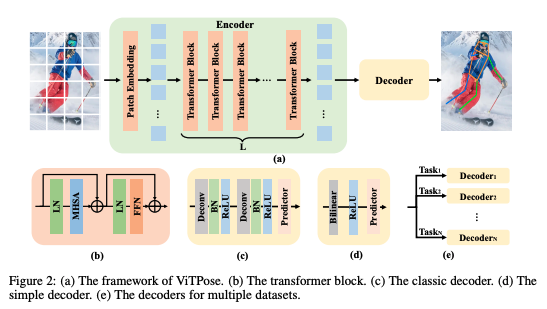
You can find all ViTPose and ViTPose++ checkpoints under the ViTPose collection.
The example below demonstrates pose estimation with the VitPoseForPoseEstimation class.
import torchimport requestsimport numpy as npimport supervision as svfrom PIL import Imagefrom transformers import AutoProcessor, RTDetrForObjectDetection, VitPoseForPoseEstimationfrom accelerate import Accelerator
device = Accelerator().device
url = "https://www.fcbarcelona.com/fcbarcelona/photo/2021/01/31/3c55a19f-dfc1-4451-885e-afd14e890a11/mini_2021-01-31-BARCELONA-ATHLETIC-BILBAOI-30.JPG"image = Image.open(requests.get(url, stream=True).raw)
# Detect humans in the imageperson_image_processor = AutoProcessor.from_pretrained("PekingU/rtdetr_r50vd_coco_o365")person_model = RTDetrForObjectDetection.from_pretrained("PekingU/rtdetr_r50vd_coco_o365", device_map=device)
inputs = person_image_processor(images=image, return_tensors="pt").to(person_model.device)
with torch.no_grad():    outputs = person_model(**inputs)
results = person_image_processor.post_process_object_detection(    outputs, target_sizes=torch.tensor([(image.height, image.width)]), threshold=0.3)result = results[0]
# Human label refers 0 index in COCO datasetperson_boxes = result["boxes"][result["labels"] == 0]person_boxes = person_boxes.cpu().numpy()
# Convert boxes from VOC (x1, y1, x2, y2) to COCO (x1, y1, w, h) formatperson_boxes[:, 2] = person_boxes[:, 2] - person_boxes[:, 0]person_boxes[:, 3] = person_boxes[:, 3] - person_boxes[:, 1]
# Detect keypoints for each person foundimage_processor = AutoProcessor.from_pretrained("usyd-community/vitpose-base-simple")model = VitPoseForPoseEstimation.from_pretrained("usyd-community/vitpose-base-simple", device_map=device)
inputs = image_processor(image, boxes=[person_boxes], return_tensors="pt").to(model.device)
with torch.no_grad():    outputs = model(**inputs)
pose_results = image_processor.post_process_pose_estimation(outputs, boxes=[person_boxes])image_pose_result = pose_results[0]
xy = torch.stack([pose_result['keypoints'] for pose_result in image_pose_result]).cpu().numpy()scores = torch.stack([pose_result['scores'] for pose_result in image_pose_result]).cpu().numpy()
key_points = sv.KeyPoints(    xy=xy, confidence=scores)
edge_annotator = sv.EdgeAnnotator(    color=sv.Color.GREEN,    thickness=1)vertex_annotator = sv.VertexAnnotator(    color=sv.Color.RED,    radius=2)annotated_frame = edge_annotator.annotate(    scene=image.copy(),    key_points=key_points)annotated_frame = vertex_annotator.annotate(    scene=annotated_frame,    key_points=key_points)annotated_frame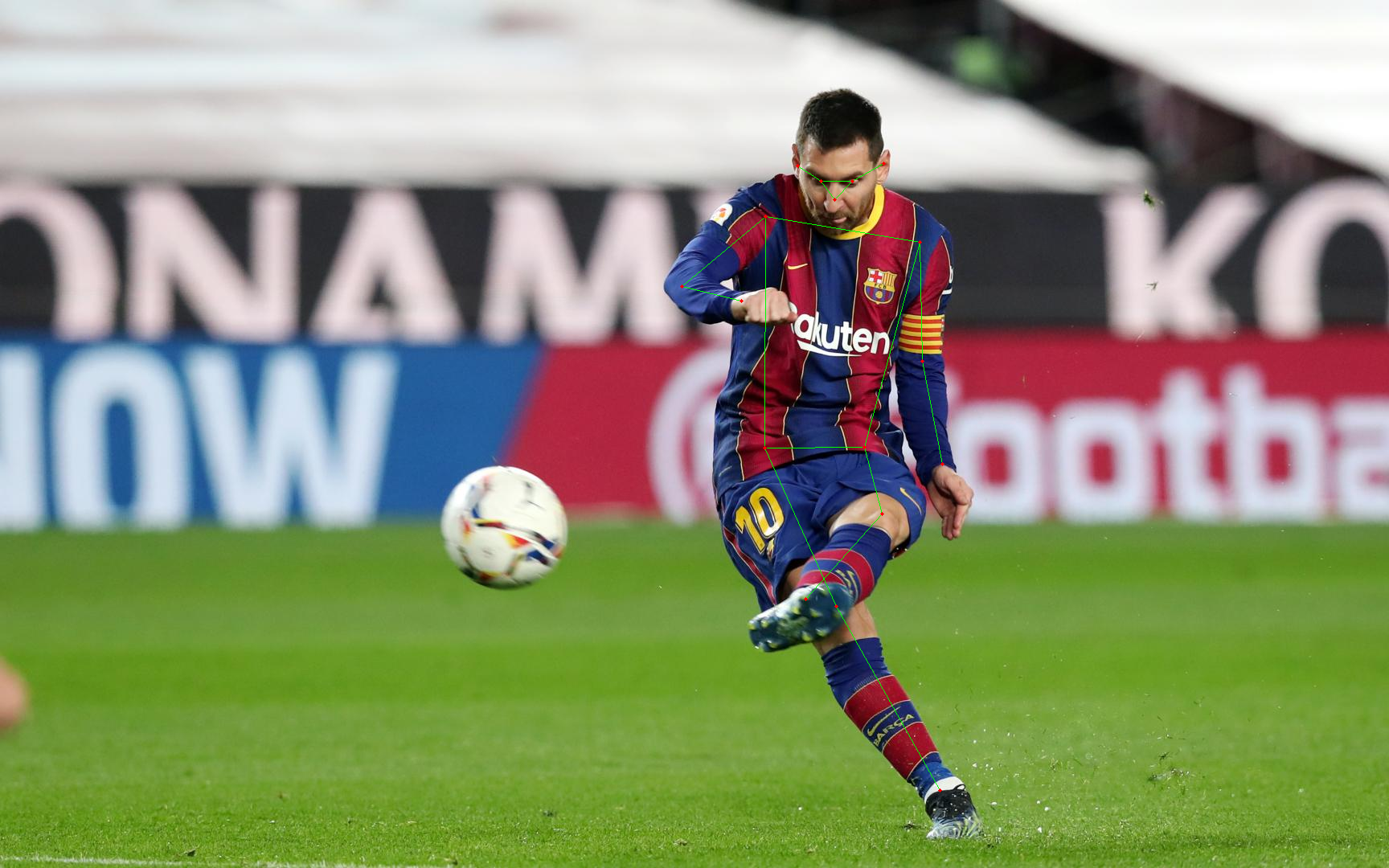
Quantization reduces the memory burden of large models by representing the weights in a lower precision. Refer to the Quantization overview for more available quantization backends.
The example below uses torchao to only quantize the weights to int4.
# pip install torchaoimport torchimport requestsimport numpy as npfrom PIL import Imagefrom transformers import AutoProcessor, RTDetrForObjectDetection, VitPoseForPoseEstimation, TorchAoConfig
url = "https://www.fcbarcelona.com/fcbarcelona/photo/2021/01/31/3c55a19f-dfc1-4451-885e-afd14e890a11/mini_2021-01-31-BARCELONA-ATHLETIC-BILBAOI-30.JPG"image = Image.open(requests.get(url, stream=True).raw)
person_image_processor = AutoProcessor.from_pretrained("PekingU/rtdetr_r50vd_coco_o365")person_model = RTDetrForObjectDetection.from_pretrained("PekingU/rtdetr_r50vd_coco_o365", device_map=device)
inputs = person_image_processor(images=image, return_tensors="pt").to(device)
with torch.no_grad():    outputs = person_model(**inputs)
results = person_image_processor.post_process_object_detection(    outputs, target_sizes=torch.tensor([(image.height, image.width)]), threshold=0.3)result = results[0]
person_boxes = result["boxes"][result["labels"] == 0]person_boxes = person_boxes.cpu().numpy()
person_boxes[:, 2] = person_boxes[:, 2] - person_boxes[:, 0]person_boxes[:, 3] = person_boxes[:, 3] - person_boxes[:, 1]
quantization_config = TorchAoConfig("int4_weight_only", group_size=128)
image_processor = AutoProcessor.from_pretrained("usyd-community/vitpose-plus-huge")model = VitPoseForPoseEstimation.from_pretrained("usyd-community/vitpose-plus-huge", device_map=device, quantization_config=quantization_config)
inputs = image_processor(image, boxes=[person_boxes], return_tensors="pt").to(device)
with torch.no_grad():    outputs = model(**inputs)
pose_results = image_processor.post_process_pose_estimation(outputs, boxes=[person_boxes])image_pose_result = pose_results[0]-
Use
AutoProcessorto automatically prepare bounding box and image inputs. -
ViTPose is a top-down pose estimator. It uses a object detector to detect individuals first before keypoint prediction.
-
ViTPose++ has 6 different MoE expert heads (COCO validation
0, AiC1, MPII2, AP-10K3, APT-36K4, COCO-WholeBody5) which supports 6 different datasets. Pass a specific value corresponding to the dataset to thedataset_indexto indicate which expert to use.from transformers import AutoProcessor, VitPoseForPoseEstimationfrom accelerate import Acceleratordevice = Accelerator().deviceimage_processor = AutoProcessor.from_pretrained("usyd-community/vitpose-plus-base")model = VitPoseForPoseEstimation.from_pretrained("usyd-community/vitpose-plus-base", device=device)inputs = image_processor(image, boxes=[person_boxes], return_tensors="pt").to(model.device)dataset_index = torch.tensor([0], device=device) # must be a tensor of shape (batch_size,)with torch.no_grad():outputs = model(**inputs, dataset_index=dataset_index) -
OpenCV is an alternative option for visualizing the estimated pose.
# pip install opencv-pythonimport mathimport cv2def draw_points(image, keypoints, scores, pose_keypoint_color, keypoint_score_threshold, radius, show_keypoint_weight):if pose_keypoint_color is not None:assert len(pose_keypoint_color) == len(keypoints)for kid, (kpt, kpt_score) in enumerate(zip(keypoints, scores)):x_coord, y_coord = int(kpt[0]), int(kpt[1])if kpt_score > keypoint_score_threshold:color = tuple(int(c) for c in pose_keypoint_color[kid])if show_keypoint_weight:cv2.circle(image, (int(x_coord), int(y_coord)), radius, color, -1)transparency = max(0, min(1, kpt_score))cv2.addWeighted(image, transparency, image, 1 - transparency, 0, dst=image)else:cv2.circle(image, (int(x_coord), int(y_coord)), radius, color, -1)def draw_links(image, keypoints, scores, keypoint_edges, link_colors, keypoint_score_threshold, thickness, show_keypoint_weight, stick_width = 2):height, width, _ = image.shapeif keypoint_edges is not None and link_colors is not None:assert len(link_colors) == len(keypoint_edges)for sk_id, sk in enumerate(keypoint_edges):x1, y1, score1 = (int(keypoints[sk[0], 0]), int(keypoints[sk[0], 1]), scores[sk[0]])x2, y2, score2 = (int(keypoints[sk[1], 0]), int(keypoints[sk[1], 1]), scores[sk[1]])if (x1 > 0and x1 < widthand y1 > 0and y1 < heightand x2 > 0and x2 < widthand y2 > 0and y2 < heightand score1 > keypoint_score_thresholdand score2 > keypoint_score_threshold):color = tuple(int(c) for c in link_colors[sk_id])if show_keypoint_weight:X = (x1, x2)Y = (y1, y2)mean_x = np.mean(X)mean_y = np.mean(Y)length = ((Y[0] - Y[1]) ** 2 + (X[0] - X[1]) ** 2) ** 0.5angle = math.degrees(math.atan2(Y[0] - Y[1], X[0] - X[1]))polygon = cv2.ellipse2Poly((int(mean_x), int(mean_y)), (int(length / 2), int(stick_width)), int(angle), 0, 360, 1)cv2.fillConvexPoly(image, polygon, color)transparency = max(0, min(1, 0.5 * (keypoints[sk[0], 2] + keypoints[sk[1], 2])))cv2.addWeighted(image, transparency, image, 1 - transparency, 0, dst=image)else:cv2.line(image, (x1, y1), (x2, y2), color, thickness=thickness)# Note: keypoint_edges and color palette are dataset-specifickeypoint_edges = model.config.edgespalette = np.array([[255, 128, 0],[255, 153, 51],[255, 178, 102],[230, 230, 0],[255, 153, 255],[153, 204, 255],[255, 102, 255],[255, 51, 255],[102, 178, 255],[51, 153, 255],[255, 153, 153],[255, 102, 102],[255, 51, 51],[153, 255, 153],[102, 255, 102],[51, 255, 51],[0, 255, 0],[0, 0, 255],[255, 0, 0],[255, 255, 255],])link_colors = palette[[0, 0, 0, 0, 7, 7, 7, 9, 9, 9, 9, 9, 16, 16, 16, 16, 16, 16, 16]]keypoint_colors = palette[[16, 16, 16, 16, 16, 9, 9, 9, 9, 9, 9, 0, 0, 0, 0, 0, 0]]numpy_image = np.array(image)for pose_result in image_pose_result:scores = np.array(pose_result["scores"])keypoints = np.array(pose_result["keypoints"])# draw each point on imagedraw_points(numpy_image, keypoints, scores, keypoint_colors, keypoint_score_threshold=0.3, radius=4, show_keypoint_weight=False)# draw linksdraw_links(numpy_image, keypoints, scores, keypoint_edges, link_colors, keypoint_score_threshold=0.3, thickness=1, show_keypoint_weight=False)pose_image = Image.fromarray(numpy_image)pose_image
Resources
Section titled “Resources”Refer to resources below to learn more about using ViTPose.
- This notebook demonstrates inference and visualization.
- This Space demonstrates ViTPose on images and video.
VitPoseImageProcessor
Section titled “VitPoseImageProcessor”[[autodoc]] VitPoseImageProcessor - preprocess - post_process_pose_estimation
VitPoseImageProcessorFast
Section titled “VitPoseImageProcessorFast”[[autodoc]] VitPoseImageProcessorFast - preprocess - post_process_pose_estimation
VitPoseConfig
Section titled “VitPoseConfig”[[autodoc]] VitPoseConfig
VitPoseForPoseEstimation
Section titled “VitPoseForPoseEstimation”[[autodoc]] VitPoseForPoseEstimation - forward