SuperPoint
This model was released on 2017-12-20 and added to Hugging Face Transformers on 2024-03-19.

SuperPoint
Section titled “SuperPoint”SuperPoint is the result of self-supervised training of a fully-convolutional network for interest point detection and description. The model is able to detect interest points that are repeatable under homographic transformations and provide a descriptor for each point. Usage on it’s own is limited, but it can be used as a feature extractor for other tasks such as homography estimation and image matching.
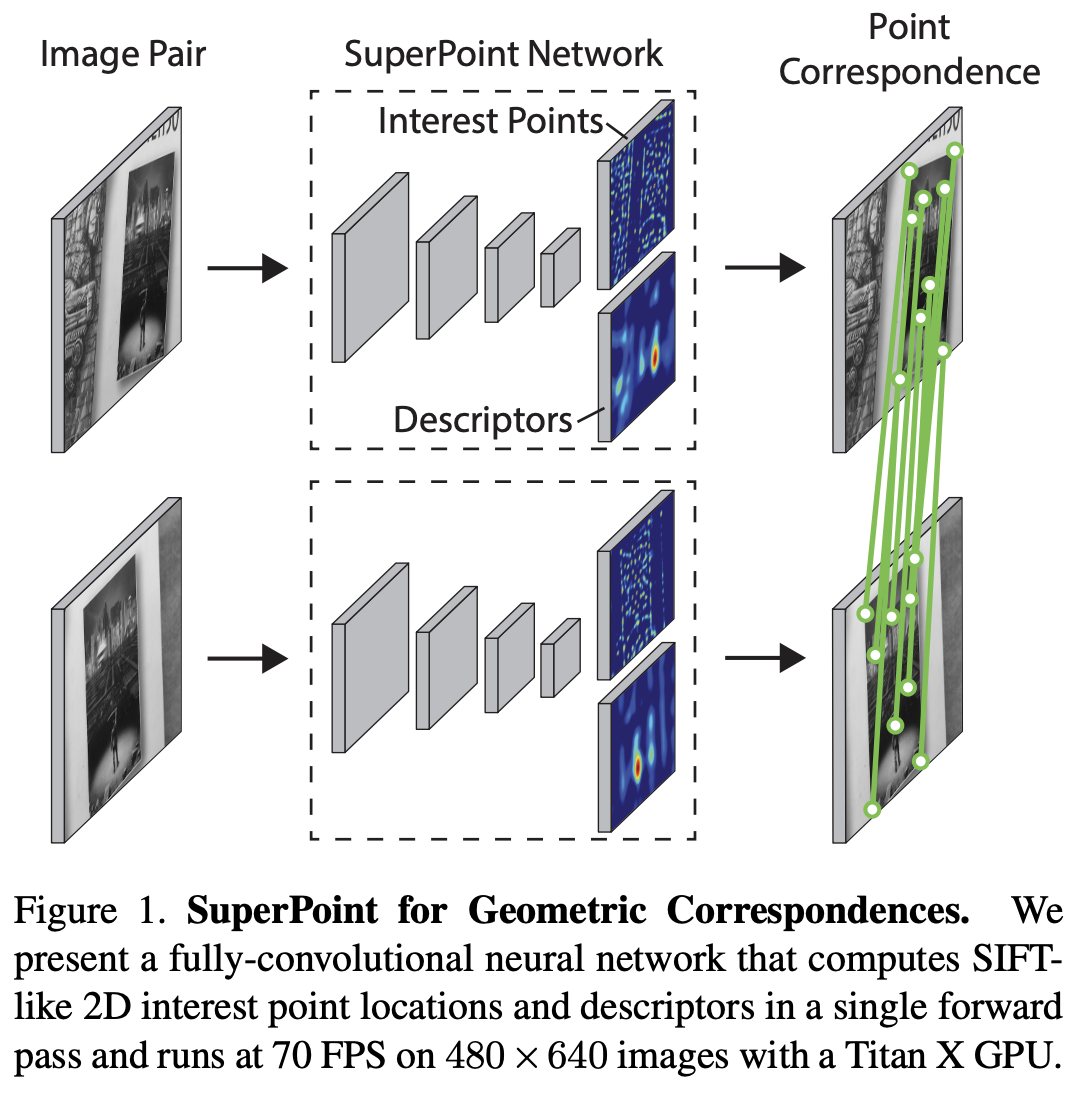
You can find all the original SuperPoint checkpoints under the Magic Leap Community organization.
Click on the SuperPoint models in the right sidebar for more examples of how to apply SuperPoint to different computer vision tasks.
The example below demonstrates how to detect interest points in an image with the AutoModel class.
from transformers import AutoImageProcessor, SuperPointForKeypointDetectionimport torchfrom PIL import Imageimport requests
url = "http://images.cocodataset.org/val2017/000000039769.jpg"image = Image.open(requests.get(url, stream=True).raw)
processor = AutoImageProcessor.from_pretrained("magic-leap-community/superpoint")model = SuperPointForKeypointDetection.from_pretrained("magic-leap-community/superpoint")
inputs = processor(image, return_tensors="pt")with torch.no_grad():    outputs = model(**inputs)
# Post-process to get keypoints, scores, and descriptorsimage_size = (image.height, image.width)processed_outputs = processor.post_process_keypoint_detection(outputs, [image_size])-
SuperPoint outputs a dynamic number of keypoints per image, which makes it suitable for tasks requiring variable-length feature representations.
from transformers import AutoImageProcessor, SuperPointForKeypointDetectionimport torchfrom PIL import Imageimport requestsprocessor = AutoImageProcessor.from_pretrained("magic-leap-community/superpoint")model = SuperPointForKeypointDetection.from_pretrained("magic-leap-community/superpoint")url_image_1 = "http://images.cocodataset.org/val2017/000000039769.jpg"image_1 = Image.open(requests.get(url_image_1, stream=True).raw)url_image_2 = "http://images.cocodataset.org/test-stuff2017/000000000568.jpg"image_2 = Image.open(requests.get(url_image_2, stream=True).raw)images = [image_1, image_2]inputs = processor(images, return_tensors="pt")# Example of handling dynamic keypoint outputoutputs = model(**inputs)keypoints = outputs.keypoints # Shape varies per imagescores = outputs.scores # Confidence scores for each keypointdescriptors = outputs.descriptors # 256-dimensional descriptorsmask = outputs.mask # Value of 1 corresponds to a keypoint detection -
The model provides both keypoint coordinates and their corresponding descriptors (256-dimensional vectors) in a single forward pass.
-
For batch processing with multiple images, you need to use the mask attribute to retrieve the respective information for each image. You can use the
post_process_keypoint_detectionfrom theSuperPointImageProcessorto retrieve the each image information.# Batch processing exampleimages = [image1, image2, image3]inputs = processor(images, return_tensors="pt")outputs = model(**inputs)image_sizes = [(img.height, img.width) for img in images]processed_outputs = processor.post_process_keypoint_detection(outputs, image_sizes) -
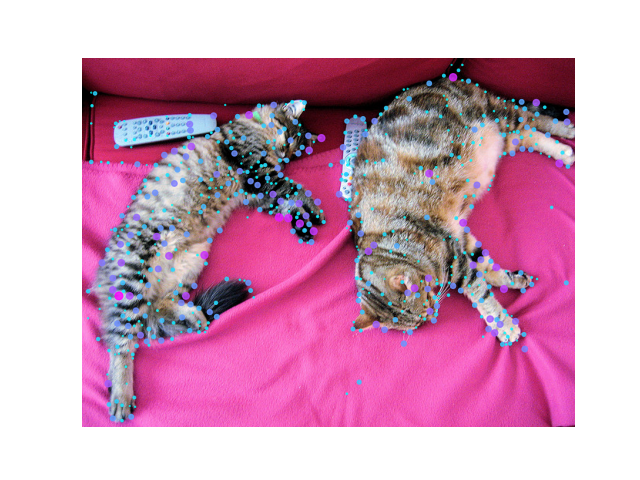
You can then print the keypoints on the image of your choice to visualize the result:
import matplotlib.pyplot as pltplt.axis("off")plt.imshow(image_1)plt.scatter(outputs[0]["keypoints"][:, 0],outputs[0]["keypoints"][:, 1],c=outputs[0]["scores"] * 100,s=outputs[0]["scores"] * 50,alpha=0.8)plt.savefig(f"output_image.png")
Resources
Section titled “Resources”- Refer to this notebook for an inference and visualization example.
SuperPointConfig
Section titled “SuperPointConfig”[[autodoc]] SuperPointConfig
SuperPointImageProcessor
Section titled “SuperPointImageProcessor”[[autodoc]] SuperPointImageProcessor - preprocess
SuperPointImageProcessorFast
Section titled “SuperPointImageProcessorFast”[[autodoc]] SuperPointImageProcessorFast - preprocess - post_process_keypoint_detection
SuperPointForKeypointDetection
Section titled “SuperPointForKeypointDetection”[[autodoc]] SuperPointForKeypointDetection - forward