SuperGlue
This model was released on 2019-11-26 and added to Hugging Face Transformers on 2025-01-20.

SuperGlue
Section titled “SuperGlue”SuperGlue is a neural network that matches two sets of local features by jointly finding correspondences and rejecting non-matchable points. Assignments are estimated by solving a differentiable optimal transport problem, whose costs are predicted by a graph neural network. SuperGlue introduces a flexible context aggregation mechanism based on attention, enabling it to reason about the underlying 3D scene and feature assignments jointly. Paired with the SuperPoint model, it can be used to match two images and estimate the pose between them. This model is useful for tasks such as image matching, homography estimation, etc.
You can find all the original SuperGlue checkpoints under the Magic Leap Community organization.
Click on the SuperGlue models in the right sidebar for more examples of how to apply SuperGlue to different computer vision tasks.
The example below demonstrates how to match keypoints between two images with Pipeline or the AutoModel class.
from transformers import pipeline
keypoint_matcher = pipeline(task="keypoint-matching", model="magic-leap-community/superglue_outdoor")
url_0 = "https://raw.githubusercontent.com/magicleap/SuperGluePretrainedNetwork/refs/heads/master/assets/phototourism_sample_images/united_states_capitol_98169888_3347710852.jpg"url_1 = "https://raw.githubusercontent.com/magicleap/SuperGluePretrainedNetwork/refs/heads/master/assets/phototourism_sample_images/united_states_capitol_26757027_6717084061.jpg"
results = keypoint_matcher([url_0, url_1], threshold=0.9)print(results[0])# {'keypoint_image_0': {'x': ..., 'y': ...}, 'keypoint_image_1': {'x': ..., 'y': ...}, 'score': ...}
from transformers import AutoImageProcessor, AutoModelimport torchfrom PIL import Imageimport requests
url_image1 = "https://raw.githubusercontent.com/magicleap/SuperGluePretrainedNetwork/refs/heads/master/assets/phototourism_sample_images/united_states_capitol_98169888_3347710852.jpg"image1 = Image.open(requests.get(url_image1, stream=True).raw)url_image2 = "https://raw.githubusercontent.com/magicleap/SuperGluePretrainedNetwork/refs/heads/master/assets/phototourism_sample_images/united_states_capitol_26757027_6717084061.jpg"image2 = Image.open(requests.get(url_image2, stream=True).raw)
images = [image1, image2]
processor = AutoImageProcessor.from_pretrained("magic-leap-community/superglue_outdoor")model = AutoModel.from_pretrained("magic-leap-community/superglue_outdoor")
inputs = processor(images, return_tensors="pt")with torch.inference_mode(): outputs = model(**inputs)
# Post-process to get keypoints and matchesimage_sizes = [[(image.height, image.width) for image in images]]processed_outputs = processor.post_process_keypoint_matching(outputs, image_sizes, threshold=0.2)-
SuperGlue performs feature matching between two images simultaneously, requiring pairs of images as input.
from transformers import AutoImageProcessor, AutoModelimport torchfrom PIL import Imageimport requestsprocessor = AutoImageProcessor.from_pretrained("magic-leap-community/superglue_outdoor")model = AutoModel.from_pretrained("magic-leap-community/superglue_outdoor")# SuperGlue requires pairs of imagesimages = [image1, image2]inputs = processor(images, return_tensors="pt")with torch.inference_mode():outputs = model(**inputs)# Extract matching informationkeypoints0 = outputs.keypoints0 # Keypoints in first imagekeypoints1 = outputs.keypoints1 # Keypoints in second imagematches = outputs.matches # Matching indicesmatching_scores = outputs.matching_scores # Confidence scores -
The model outputs matching indices, keypoints, and confidence scores for each match.
-
For better visualization and analysis, use the
post_process_keypoint_matchingmethod to get matches in a more readable format.# Process outputs for visualizationimage_sizes = [[(image.height, image.width) for image in images]]processed_outputs = processor.post_process_keypoint_matching(outputs, image_sizes, threshold=0.2)for i, output in enumerate(processed_outputs):print(f"For the image pair {i}")for keypoint0, keypoint1, matching_score in zip(output["keypoints0"], output["keypoints1"], output["matching_scores"]):print(f"Keypoint at {keypoint0.numpy()} matches with keypoint at {keypoint1.numpy()} with score {matching_score}") -
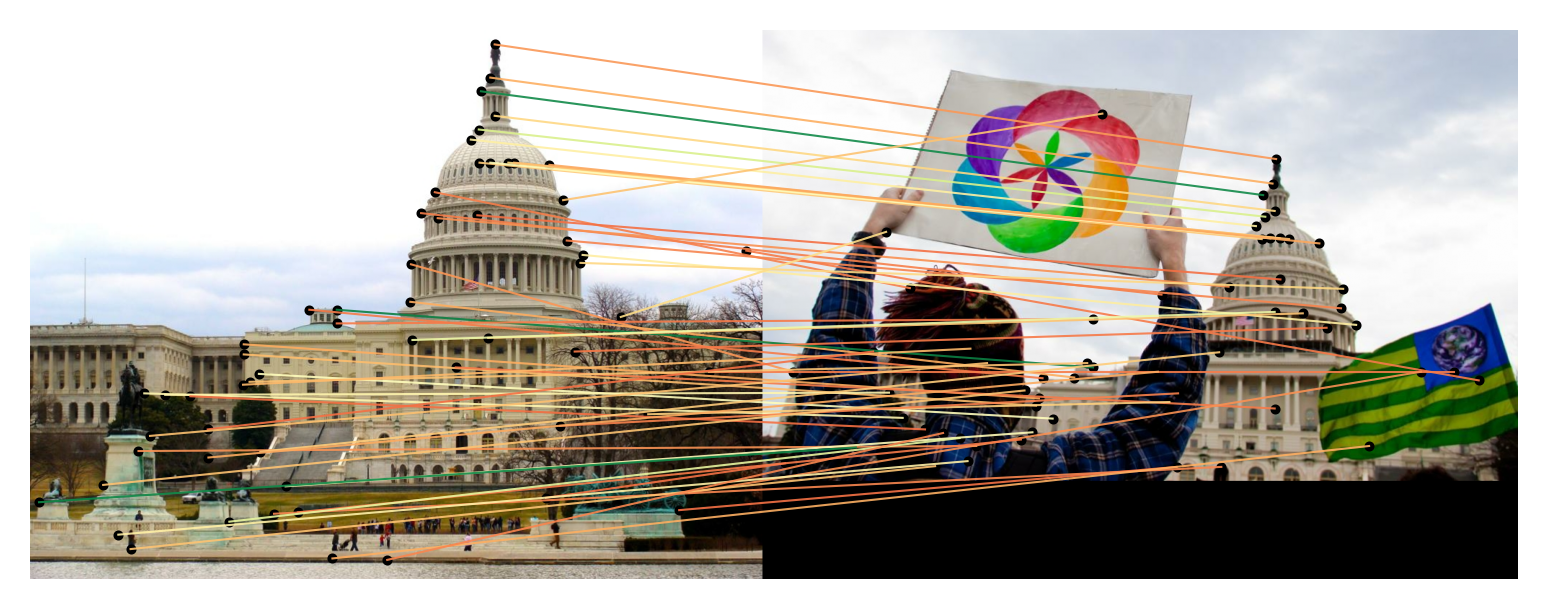
Visualize the matches between the images using the built-in plotting functionality.
# Easy visualization using the built-in plotting methodprocessor.visualize_keypoint_matching(images, processed_outputs)
Resources
Section titled “Resources”- Refer to the original SuperGlue repository for more examples and implementation details.
SuperGlueConfig
Section titled “SuperGlueConfig”[[autodoc]] SuperGlueConfig
SuperGlueImageProcessor
Section titled “SuperGlueImageProcessor”[[autodoc]] SuperGlueImageProcessor - preprocess - post_process_keypoint_matching - visualize_keypoint_matching
SuperGlueImageProcessorFast
Section titled “SuperGlueImageProcessorFast”[[autodoc]] SuperGlueImageProcessorFast - preprocess - post_process_keypoint_matching - visualize_keypoint_matching
SuperGlueForKeypointMatching
Section titled “SuperGlueForKeypointMatching”[[autodoc]] SuperGlueForKeypointMatching - forward