SegFormer
This model was released on 2021-05-31 and added to Hugging Face Transformers on 2021-10-28.

SegFormer
Section titled “SegFormer”SegFormer: Simple and Efficient Design for Semantic Segmentation with Transformers is a semantic segmentation model that combines a hierarchical Transformer encoder (Mix Transformer, MiT) with a lightweight all-MLP decoder. It avoids positional encodings and complex decoders and achieves state-of-the-art performance on benchmarks like ADE20K and Cityscapes. This simple and lightweight design is more efficient and scalable.
The figure below illustrates the architecture of SegFormer.
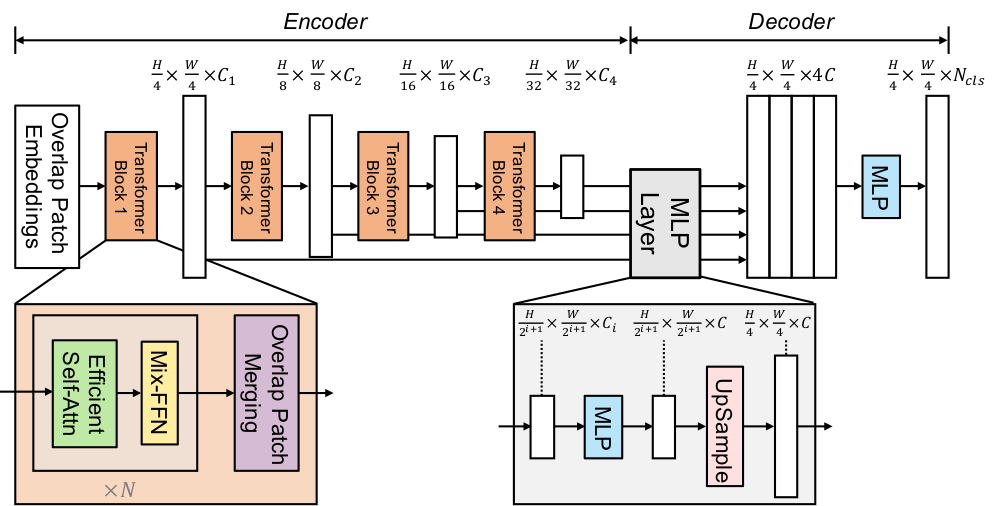
You can find all the original SegFormer checkpoints under the NVIDIA organization.
Click on the SegFormer models in the right sidebar for more examples of how to apply SegFormer to different vision tasks.
The example below demonstrates semantic segmentation with Pipeline or the AutoModel class.
import torchfrom transformers import pipeline
pipeline = pipeline(task="image-segmentation", model="nvidia/segformer-b0-finetuned-ade-512-512", torch_dtype=torch.float16)pipeline("https://huggingface.co/datasets/huggingface/documentation-images/resolve/main/pipeline-cat-chonk.jpeg")
import requestsfrom PIL import Imagefrom transformers import AutoProcessor, AutoModelForSemanticSegmentation
url = "https://huggingface.co/datasets/huggingface/documentation-images/resolve/main/pipeline-cat-chonk.jpeg"image = Image.open(requests.get(url, stream=True).raw)
processor = AutoProcessor.from_pretrained("nvidia/segformer-b0-finetuned-ade-512-512")model = AutoModelForSemanticSegmentation.from_pretrained("nvidia/segformer-b0-finetuned-ade-512-512")
inputs = processor(images=image, return_tensors="pt")outputs = model(**inputs)logits = outputs.logits # shape [batch, num_labels, height, width]-
SegFormer works with any input size, padding inputs to be divisible by
config.patch_sizes. -
The most important preprocessing step is to randomly crop and pad all images to the same size (such as 512x512 or 640x640) and normalize afterwards.
-
Some datasets (ADE20k) uses the
0index in the annotated segmentation as the background, but doesn’t include the “background” class in its labels. Thedo_reduce_labelsargument inSegformerForImageProcessoris used to reduce all labels by1. To make sure no loss is computed for the background class, it replaces0in the annotated maps by255, which is theignore_indexof the loss function.Other datasets may include a background class and label though, in which case,
do_reduce_labelsshould beFalse.
from transformers import SegformerImageProcessorprocessor = SegformerImageProcessor(do_reduce_labels=True)Resources
Section titled “Resources”- Original SegFormer code (NVlabs)
- Fine-tuning blog post
- Tutorial notebooks (Niels Rogge)
- Hugging Face demo space
SegformerConfig
Section titled “SegformerConfig”[[autodoc]] SegformerConfig
SegformerImageProcessor
Section titled “SegformerImageProcessor”[[autodoc]] SegformerImageProcessor - preprocess - post_process_semantic_segmentation
SegformerImageProcessorFast
Section titled “SegformerImageProcessorFast”[[autodoc]] SegformerImageProcessorFast - preprocess - post_process_semantic_segmentation
SegformerModel
Section titled “SegformerModel”[[autodoc]] SegformerModel - forward
SegformerDecodeHead
Section titled “SegformerDecodeHead”[[autodoc]] SegformerDecodeHead - forward
SegformerForImageClassification
Section titled “SegformerForImageClassification”[[autodoc]] SegformerForImageClassification - forward
SegformerForSemanticSegmentation
Section titled “SegformerForSemanticSegmentation”[[autodoc]] SegformerForSemanticSegmentation - forward