Pixtral
This model was released on 2024-09-17 and added to Hugging Face Transformers on 2024-09-14.

Pixtral
Section titled “Pixtral”Pixtral is a multimodal model trained to understand natural images and documents. It accepts images in their natural resolution and aspect ratio without resizing or padding due to it’s 2D RoPE embeddings. In addition, Pixtral has a long 128K token context window for processing a large number of images. Pixtral couples a 400M vision encoder with a 12B Mistral Nemo decoder.
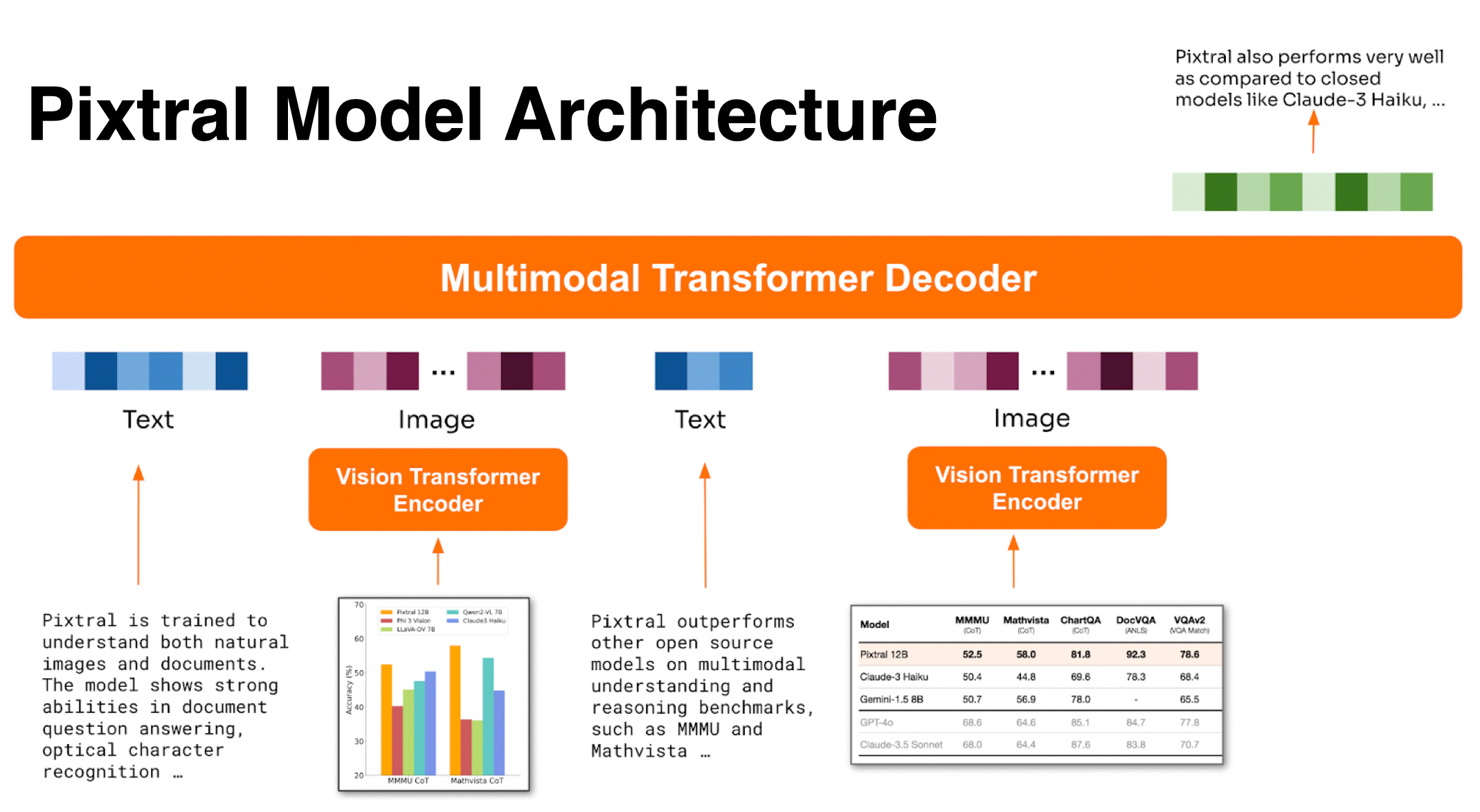
Pixtral architecture. Taken from the blog post.
You can find all the original Pixtral checkpoints under the Mistral AI organization.
import torchfrom transformers import AutoProcessor, LlavaForConditionalGeneration
model_id = "mistral-community/pixtral-12b"model = LlavaForConditionalGeneration.from_pretrained(model_id, dtype="auto", device_map="auto")processor = AutoProcessor.from_pretrained(model_id)
url_dog = "https://picsum.photos/id/237/200/300"url_mountain = "https://picsum.photos/seed/picsum/200/300"
chat = [    {      "role": "user", "content": [        {"type": "text", "content": "Can this animal"},        {"type": "image", "url": url_dog},        {"type": "text", "content": "live here?"},        {"type": "image", "url" : url_mountain}      ]    }]
inputs = processor.apply_chat_template(chat, add_generation_prompt=True, tokenize=True, return_dict=True, return_tensors"pt").to(model.device)generate_ids = model.generate(**inputs, max_new_tokens=500)output = processor.batch_decode(generate_ids, skip_special_tokens=True, clean_up_tokenization_spaces=False)[0]
Quantization reduces the memory burden of large models by representing the weights in a lower precision. Refer to the Quantization overview for more available quantization backends.
The example below uses bitsandbytes to quantize the model to 4-bits.
import torchimport requestsfrom PIL import Imagefrom transformers import AutoProcessor, LlavaForConditionalGeneration, BitsAndBytesConfig
model_id = "mistral-community/pixtral-12b"
quantization_config = BitsAndBytesConfig(    load_in_4bit=True,    bnb_4bit_quant_type="nf4",    bnb_4bit_compute_dtype=torch.bfloat16)
model = LlavaForConditionalGeneration.from_pretrained(    model_id,    quantization_config=quantization_config,    device_map="auto")processor = AutoProcessor.from_pretrained(model_id)
dog_url = "https://picsum.photos/id/237/200/300"mountain_url = "https://picsum.photos/seed/picsum/200/300"dog_image = Image.open(requests.get(dog_url, stream=True).raw)mountain_image = Image.open(requests.get(mountain_url, stream=True).raw)
chat = [    {      "role": "user", "content": [        {"type": "text", "text": "Can this animal"},        {"type": "image"},        {"type": "text", "text": "live here?"},        {"type": "image"}      ]    }]
prompt = processor.apply_chat_template(chat, tokenize=False, add_generation_prompt=True)inputs = processor(text=prompt, images=[dog_image, mountain_image], return_tensors="pt")
inputs["pixel_values"] = inputs["pixel_values"].to(model.dtype)inputs = {k: v.to(model.device) for k, v in inputs.items()}
generate_ids = model.generate(**inputs, max_new_tokens=100)output = processor.batch_decode(generate_ids, skip_special_tokens=True, clean_up_tokenization_spaces=False)print(output)-
Pixtral uses
PixtralVisionModelas the vision encoder andMistralForCausalLMfor its language decoder. -
The model internally replaces
[IMG]token placeholders with image embeddings."<s>[INST][IMG]\nWhat are the things I should be cautious about when I visit this place?[/INST]"The
[IMG]tokens are replaced with a number of[IMG]tokens that depend on the height and width of each image. Each row of the image is separated by a[IMG_BREAK]token and each image is separated by a[IMG_END]token. Use theapply_chat_templatemethod to handle these tokens for you.
PixtralVisionConfig
Section titled “PixtralVisionConfig”[[autodoc]] PixtralVisionConfig
MistralCommonBackend
Section titled “MistralCommonBackend”[[autodoc]] MistralCommonBackend
PixtralVisionModel
Section titled “PixtralVisionModel”[[autodoc]] PixtralVisionModel - forward
PixtralImageProcessor
Section titled “PixtralImageProcessor”[[autodoc]] PixtralImageProcessor - preprocess
PixtralImageProcessorFast
Section titled “PixtralImageProcessorFast”[[autodoc]] PixtralImageProcessorFast - preprocess
PixtralProcessor
Section titled “PixtralProcessor”[[autodoc]] PixtralProcessor