MarkupLM
This model was released on 2021-10-16 and added to Hugging Face Transformers on 2022-09-30.
MarkupLM
Section titled “MarkupLM”
Overview
Section titled “Overview”The MarkupLM model was proposed in MarkupLM: Pre-training of Text and Markup Language for Visually-rich Document Understanding by Junlong Li, Yiheng Xu, Lei Cui, Furu Wei. MarkupLM is BERT, but applied to HTML pages instead of raw text documents. The model incorporates additional embedding layers to improve performance, similar to LayoutLM.
The model can be used for tasks like question answering on web pages or information extraction from web pages. It obtains state-of-the-art results on 2 important benchmarks:
- WebSRC, a dataset for Web-Based Structural Reading Comprehension (a bit like SQuAD but for web pages)
- SWDE, a dataset for information extraction from web pages (basically named-entity recognition on web pages)
The abstract from the paper is the following:
Multimodal pre-training with text, layout, and image has made significant progress for Visually-rich Document Understanding (VrDU), especially the fixed-layout documents such as scanned document images. While, there are still a large number of digital documents where the layout information is not fixed and needs to be interactively and dynamically rendered for visualization, making existing layout-based pre-training approaches not easy to apply. In this paper, we propose MarkupLM for document understanding tasks with markup languages as the backbone such as HTML/XML-based documents, where text and markup information is jointly pre-trained. Experiment results show that the pre-trained MarkupLM significantly outperforms the existing strong baseline models on several document understanding tasks. The pre-trained model and code will be publicly available.
This model was contributed by nielsr. The original code can be found here.
Usage tips
Section titled “Usage tips”- In addition to
input_ids,forwardexpects 2 additional inputs, namelyxpath_tags_seqandxpath_subs_seq. These are the XPATH tags and subscripts respectively for each token in the input sequence. - One can use
MarkupLMProcessorto prepare all data for the model. Refer to the usage guide for more info.
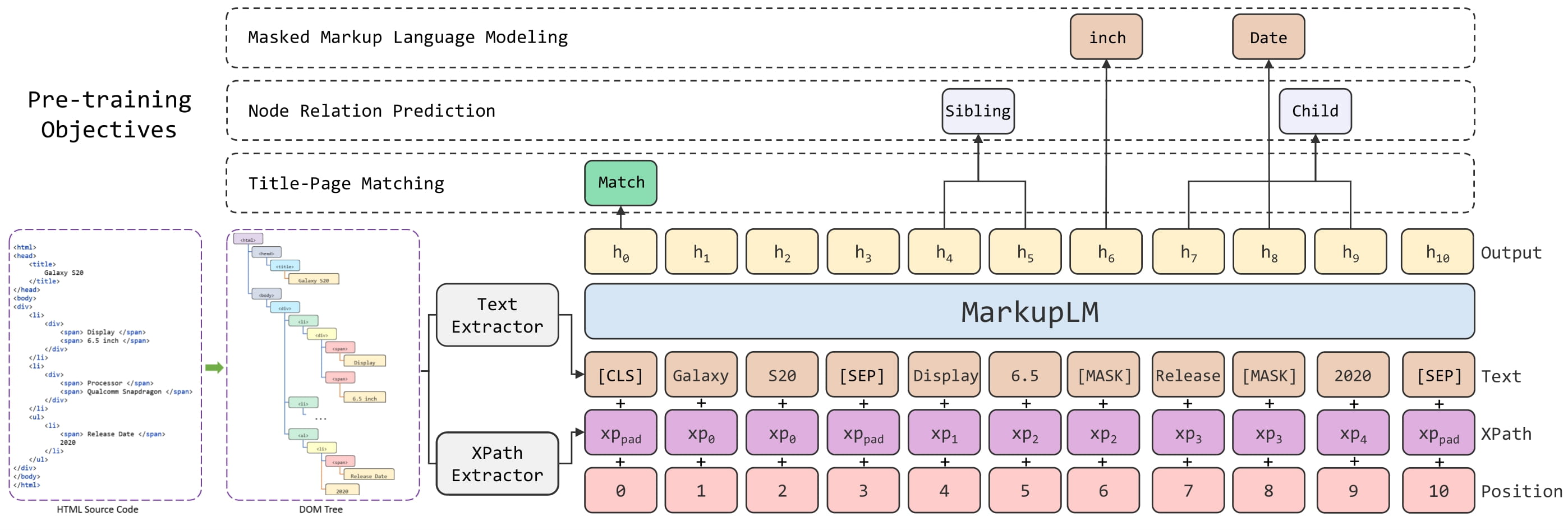
MarkupLM architecture. Taken from the original paper.
Usage: MarkupLMProcessor
Section titled “Usage: MarkupLMProcessor”The easiest way to prepare data for the model is to use MarkupLMProcessor, which internally combines a feature extractor
(MarkupLMFeatureExtractor) and a tokenizer (MarkupLMTokenizer or MarkupLMTokenizerFast). The feature extractor is
used to extract all nodes and xpaths from the HTML strings, which are then provided to the tokenizer, which turns them into the
token-level inputs of the model (input_ids etc.). Note that you can still use the feature extractor and tokenizer separately,
if you only want to handle one of the two tasks.
from transformers import MarkupLMFeatureExtractor, MarkupLMTokenizerFast, MarkupLMProcessor
feature_extractor = MarkupLMFeatureExtractor()tokenizer = MarkupLMTokenizerFast.from_pretrained("microsoft/markuplm-base")processor = MarkupLMProcessor(feature_extractor, tokenizer)
In short, one can provide HTML strings (and possibly additional data) to MarkupLMProcessor,
and it will create the inputs expected by the model. Internally, the processor first uses
MarkupLMFeatureExtractor to get a list of nodes and corresponding xpaths. The nodes and
xpaths are then provided to MarkupLMTokenizer or MarkupLMTokenizerFast, which converts them
to token-level input_ids, attention_mask, token_type_ids, xpath_subs_seq, xpath_tags_seq.
Optionally, one can provide node labels to the processor, which are turned into token-level labels.
MarkupLMFeatureExtractor uses Beautiful Soup, a Python library for
pulling data out of HTML and XML files, under the hood. Note that you can still use your own parsing solution of
choice, and provide the nodes and xpaths yourself to MarkupLMTokenizer or MarkupLMTokenizerFast.
In total, there are 5 use cases that are supported by the processor. Below, we list them all. Note that each of these use cases work for both batched and non-batched inputs (we illustrate them for non-batched inputs).
Use case 1: web page classification (training, inference) + token classification (inference), parse_html = True
This is the simplest case, in which the processor will use the feature extractor to get all nodes and xpaths from the HTML.
>>> from transformers import MarkupLMProcessor
>>> processor = MarkupLMProcessor.from_pretrained("microsoft/markuplm-base")
>>> html_string = """...  <!DOCTYPE html>...  <html>...  <head>...  <title>Hello world</title>...  </head>...  <body>...  <h1>Welcome</h1>...  <p>Here is my website.</p>...  </body>...  </html>"""
>>> # note that you can also add provide all tokenizer parameters here such as padding, truncation>>> encoding = processor(html_string, return_tensors="pt")>>> print(encoding.keys())dict_keys(['input_ids', 'token_type_ids', 'attention_mask', 'xpath_tags_seq', 'xpath_subs_seq'])
Use case 2: web page classification (training, inference) + token classification (inference), parse_html=False
In case one already has obtained all nodes and xpaths, one doesn’t need the feature extractor. In that case, one should
provide the nodes and corresponding xpaths themselves to the processor, and make sure to set parse_html to False.
>>> from transformers import MarkupLMProcessor
>>> processor = MarkupLMProcessor.from_pretrained("microsoft/markuplm-base")>>> processor.parse_html = False
>>> nodes = ["hello", "world", "how", "are"]>>> xpaths = ["/html/body/div/li[1]/div/span", "/html/body/div/li[1]/div/span", "html/body", "html/body/div"]>>> encoding = processor(nodes=nodes, xpaths=xpaths, return_tensors="pt")>>> print(encoding.keys())dict_keys(['input_ids', 'token_type_ids', 'attention_mask', 'xpath_tags_seq', 'xpath_subs_seq'])
Use case 3: token classification (training), parse_html=False
For token classification tasks (such as SWDE), one can also provide the
corresponding node labels in order to train a model. The processor will then convert these into token-level labels.
By default, it will only label the first wordpiece of a word, and label the remaining wordpieces with -100, which is the
ignore_index of PyTorch’s CrossEntropyLoss. In case you want all wordpieces of a word to be labeled, you can
initialize the tokenizer with only_label_first_subword set to False.
>>> from transformers import MarkupLMProcessor
>>> processor = MarkupLMProcessor.from_pretrained("microsoft/markuplm-base")>>> processor.parse_html = False
>>> nodes = ["hello", "world", "how", "are"]>>> xpaths = ["/html/body/div/li[1]/div/span", "/html/body/div/li[1]/div/span", "html/body", "html/body/div"]>>> node_labels = [1, 2, 2, 1]>>> encoding = processor(nodes=nodes, xpaths=xpaths, node_labels=node_labels, return_tensors="pt")>>> print(encoding.keys())dict_keys(['input_ids', 'token_type_ids', 'attention_mask', 'xpath_tags_seq', 'xpath_subs_seq', 'labels'])
Use case 4: web page question answering (inference), parse_html=True
For question answering tasks on web pages, you can provide a question to the processor. By default, the processor will use the feature extractor to get all nodes and xpaths, and create [CLS] question tokens [SEP] word tokens [SEP].
>>> from transformers import MarkupLMProcessor
>>> processor = MarkupLMProcessor.from_pretrained("microsoft/markuplm-base")
>>> html_string = """...  <!DOCTYPE html>...  <html>...  <head>...  <title>Hello world</title>...  </head>...  <body>...  <h1>Welcome</h1>...  <p>My name is Niels.</p>...  </body>...  </html>"""
>>> question = "What's his name?">>> encoding = processor(html_string, questions=question, return_tensors="pt")>>> print(encoding.keys())dict_keys(['input_ids', 'token_type_ids', 'attention_mask', 'xpath_tags_seq', 'xpath_subs_seq'])
Use case 5: web page question answering (inference), parse_html=False
For question answering tasks (such as WebSRC), you can provide a question to the processor. If you have extracted
all nodes and xpaths yourself, you can provide them directly to the processor. Make sure to set parse_html to False.
>>> from transformers import MarkupLMProcessor
>>> processor = MarkupLMProcessor.from_pretrained("microsoft/markuplm-base")>>> processor.parse_html = False
>>> nodes = ["hello", "world", "how", "are"]>>> xpaths = ["/html/body/div/li[1]/div/span", "/html/body/div/li[1]/div/span", "html/body", "html/body/div"]>>> question = "What's his name?">>> encoding = processor(nodes=nodes, xpaths=xpaths, questions=question, return_tensors="pt")>>> print(encoding.keys())dict_keys(['input_ids', 'token_type_ids', 'attention_mask', 'xpath_tags_seq', 'xpath_subs_seq'])
Resources
Section titled “Resources”- Demo notebooks
- Text classification task guide
- Token classification task guide
- Question answering task guide
MarkupLMConfig
Section titled “MarkupLMConfig”[[autodoc]] MarkupLMConfig - all
MarkupLMFeatureExtractor
Section titled “MarkupLMFeatureExtractor”[[autodoc]] MarkupLMFeatureExtractor - call
MarkupLMTokenizer
Section titled “MarkupLMTokenizer”[[autodoc]] MarkupLMTokenizer - build_inputs_with_special_tokens - get_special_tokens_mask - create_token_type_ids_from_sequences - save_vocabulary
MarkupLMTokenizerFast
Section titled “MarkupLMTokenizerFast”[[autodoc]] MarkupLMTokenizerFast - all
MarkupLMProcessor
Section titled “MarkupLMProcessor”[[autodoc]] MarkupLMProcessor - call
MarkupLMModel
Section titled “MarkupLMModel”[[autodoc]] MarkupLMModel - forward
MarkupLMForSequenceClassification
Section titled “MarkupLMForSequenceClassification”[[autodoc]] MarkupLMForSequenceClassification - forward
MarkupLMForTokenClassification
Section titled “MarkupLMForTokenClassification”[[autodoc]] MarkupLMForTokenClassification - forward
MarkupLMForQuestionAnswering
Section titled “MarkupLMForQuestionAnswering”[[autodoc]] MarkupLMForQuestionAnswering - forward