LLaVa
This model was released on 2023-04-17 and added to Hugging Face Transformers on 2023-12-07.


Overview
Section titled “Overview”LLaVa is an open-source chatbot trained by fine-tuning LlamA/Vicuna on GPT-generated multimodal instruction-following data. It is an auto-regressive language model, based on the transformer architecture. In other words, it is an multi-modal version of LLMs fine-tuned for chat / instructions.
The LLaVa model was proposed in Visual Instruction Tuning and improved in Improved Baselines with Visual Instruction Tuning by Haotian Liu, Chunyuan Li, Yuheng Li and Yong Jae Lee.
The abstract from the paper is the following:
Large multimodal models (LMM) have recently shown encouraging progress with visual instruction tuning. In this note, we show that the fully-connected vision-language cross-modal connector in LLaVA is surprisingly powerful and data-efficient. With simple modifications to LLaVA, namely, using CLIP-ViT-L-336px with an MLP projection and adding academic-task-oriented VQA data with simple response formatting prompts, we establish stronger baselines that achieve state-of-the-art across 11 benchmarks. Our final 13B checkpoint uses merely 1.2M publicly available data, and finishes full training in ∼1 day on a single 8-A100 node. We hope this can make state-of-the-art LMM research more accessible. Code and model will be publicly available
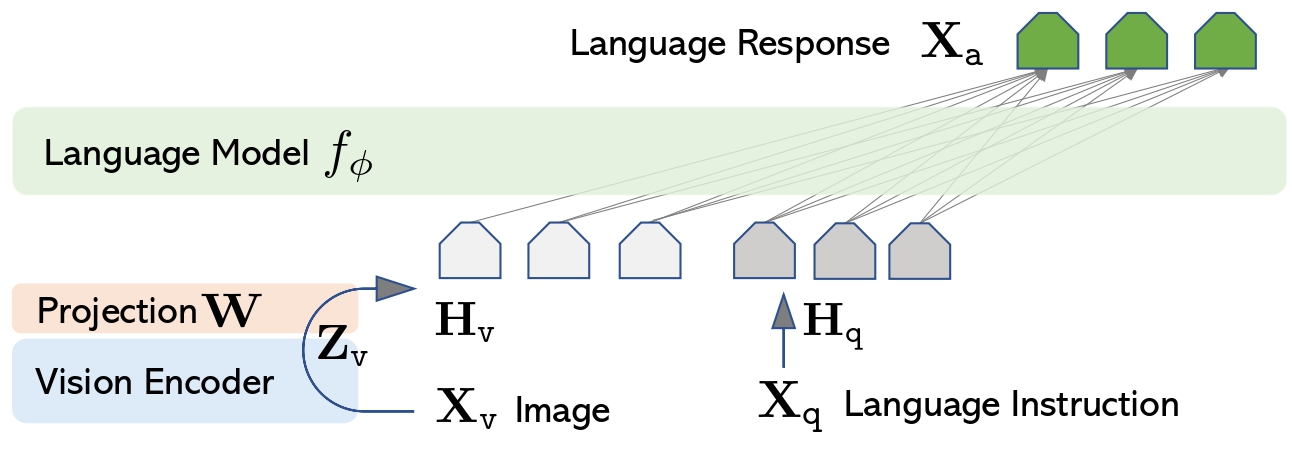
LLaVa architecture. Taken from the original paper.
This model was contributed by ArthurZ and ybelkada. The original code can be found here.
Usage tips
Section titled “Usage tips”-
We advise users to use
padding_side="left"when computing batched generation as it leads to more accurate results. Simply make sure to callprocessor.tokenizer.padding_side = "left"before generating. -
Note the model has not been explicitly trained to process multiple images in the same prompt, although this is technically possible, you may experience inaccurate results.
Adding these attributes means that LLaVA will try to infer the number of image tokens required per image and expand the text with as many <image> placeholders as there will be tokens. Usually it is around 500 tokens per image, so make sure that the text is not truncated as otherwise there will be failure when merging the embeddings.
The attributes can be obtained from model config, as model.config.vision_config.patch_size or model.config.vision_feature_select_strategy. The num_additional_image_tokens should be 1 if the vision backbone adds a CLS token or 0 if nothing extra is added to the vision patches.
Formatting Prompts with Chat Templates
Section titled “Formatting Prompts with Chat Templates”Each checkpoint is trained with a specific prompt format, depending on the underlying large language model backbone. To ensure correct formatting, use the processor’s apply_chat_template method.
Important:
- You must construct a conversation history — passing a plain string won’t work.
- Each message should be a dictionary with
"role"and"content"keys. - The
"content"should be a list of dictionaries for different modalities like"text"and"image".
Here’s an example of how to structure your input. We will use llava-hf/llava-1.5-7b-hf and a conversation history of text and image. Each content field has to be a list of dicts, as follows:
from transformers import AutoProcessor
processor = AutoProcessor.from_pretrained("llava-hf/llava-1.5-7b-hf")
conversation = [    {        "role": "user",        "content": [            {"type": "image"},            {"type": "text", "text": "What’s shown in this image?"},            ],    },    {        "role": "assistant",        "content": [{"type": "text", "text": "This image shows a red stop sign."},]    },    {
        "role": "user",        "content": [            {"type": "text", "text": "Describe the image in more details."},        ],    },]
text_prompt = processor.apply_chat_template(conversation, add_generation_prompt=True)
# Note that the template simply formats your prompt, you still have to tokenize it and obtain pixel values for your imagesprint(text_prompt)>>> "USER: <image>\n<What’s shown in this image? ASSISTANT: This image shows a red stop sign.</s>USER: Describe the image in more details. ASSISTANT:"- If you want to construct a chat prompt yourself, below is a list of prompt formats accepted by each llava checkpoint:
llava-interleave models requires the following format:
"<|im_start|>user <image>\nWhat is shown in this image?<|im_end|><|im_start|>assistant"For multiple turns conversation:
"<|im_start|>user <image>\n<prompt1><|im_end|><|im_start|>assistant <answer1><|im_end|><|im_start|>user <image>\n<prompt1><|im_end|><|im_start|>assistant "llava-1.5 models requires the following format:
"USER: <image>\n<prompt> ASSISTANT:"For multiple turns conversation:
"USER: <image>\n<prompt1> ASSISTANT: <answer1></s>USER: <prompt2> ASSISTANT: <answer2></s>USER: <prompt3> ASSISTANT:"🚀 Bonus: If you’re using transformers>=4.49.0, you can also get a vectorized output from apply_chat_template. See the Usage Examples below for more details on how to use it.
Usage examples
Section titled “Usage examples”Single input inference
Section titled “Single input inference”import torchfrom transformers import AutoProcessor, LlavaForConditionalGeneration
# Load the model in half-precisionmodel = LlavaForConditionalGeneration.from_pretrained("llava-hf/llava-1.5-7b-hf", dtype=torch.float16, device_map="auto")processor = AutoProcessor.from_pretrained("llava-hf/llava-1.5-7b-hf")
conversation = [ { "role": "user", "content": [ {"type": "image", "url": "https://www.ilankelman.org/stopsigns/australia.jpg"}, {"type": "text", "text": "What is shown in this image?"}, ], },]
inputs = processor.apply_chat_template( conversation, add_generation_prompt=True, tokenize=True, return_dict=True, return_tensors="pt").to(model.device, torch.float16)
# Generategenerate_ids = model.generate(**inputs, max_new_tokens=30)processor.batch_decode(generate_ids, skip_special_tokens=True)Batched inference
Section titled “Batched inference”LLaVa also supports batched inference. Here is how you can do it:
import torchfrom transformers import AutoProcessor, LlavaForConditionalGeneration
# Load the model in half-precisionmodel = LlavaForConditionalGeneration.from_pretrained("llava-hf/llava-1.5-7b-hf", dtype=torch.float16, device_map="auto")processor = AutoProcessor.from_pretrained("llava-hf/llava-1.5-7b-hf")

# Prepare a batch of two promptsconversation_1 = [    {        "role": "user",        "content": [            {"type": "image", "url": "https://www.ilankelman.org/stopsigns/australia.jpg"},            {"type": "text", "text": "What is shown in this image?"},        ],    },]
conversation_2 = [    {        "role": "user",        "content": [            {"type": "image", "url": "http://images.cocodataset.org/val2017/000000039769.jpg"},            {"type": "text", "text": "What is shown in this image?"},        ],    },]
inputs = processor.apply_chat_template(    [conversation_1, conversation_2],    add_generation_prompt=True,    tokenize=True,    return_dict=True,    padding=True,    return_tensors="pt").to(model.device, torch.float16)

# Generategenerate_ids = model.generate(**inputs, max_new_tokens=30)processor.batch_decode(generate_ids, skip_special_tokens=True)
Note regarding reproducing original implementation
Section titled “Note regarding reproducing original implementation”In order to match the logits of the original implementation, one needs to additionally specify do_pad=True when instantiating LlavaImageProcessor:
from transformers import LlavaImageProcessor
image_processor = LlavaImageProcessor.from_pretrained("llava-hf/llava-1.5-7b-hf", do_pad=True)
Using Flash Attention 2
Section titled “Using Flash Attention 2”Flash Attention 2 is an even faster, optimized version of the previous optimization, please refer to the Flash Attention 2 section of performance docs.
Resources
Section titled “Resources”A list of official Hugging Face and community (indicated by 🌎) resources to help you get started with BEiT.
- A Google Colab demo on how to run Llava on a free-tier Google colab instance leveraging 4-bit inference.
- A similar notebook showcasing batched inference. 🌎
LlavaConfig
Section titled “LlavaConfig”[[autodoc]] LlavaConfig
LlavaImageProcessor
Section titled “LlavaImageProcessor”[[autodoc]] LlavaImageProcessor - preprocess
LlavaImageProcessorFast
Section titled “LlavaImageProcessorFast”[[autodoc]] LlavaImageProcessorFast - preprocess
LlavaProcessor
Section titled “LlavaProcessor”[[autodoc]] LlavaProcessor
LlavaModel
Section titled “LlavaModel”[[autodoc]] LlavaModel
LlavaForConditionalGeneration
Section titled “LlavaForConditionalGeneration”[[autodoc]] LlavaForConditionalGeneration - forward