InternVL
This model was released on 2025-04-14 and added to Hugging Face Transformers on 2025-04-18.


InternVL
Section titled “InternVL”The InternVL3 family of Visual Language Models was introduced in InternVL3: Exploring Advanced Training and Test-Time Recipes for Open-Source Multimodal Models.
The abstract from the paper is the following:
We introduce InternVL3, a significant advancement in the InternVL series featuring a native multimodal pre-training paradigm. Rather than adapting a text-only large language model (LLM) into a multimodal large language model (MLLM) that supports visual inputs, InternVL3 jointly acquires multimodal and linguistic capabilities from both diverse multimodal data and pure-text corpora during a single pre-training stage. This unified training paradigm effectively addresses the complexities and alignment challenges commonly encountered in conventional post-hoc training pipelines for MLLMs. To further improve performance and scalability, InternVL3 incorporates variable visual position encoding (V2PE) to support extended multimodal contexts, employs advanced post-training techniques such as supervised fine-tuning (SFT) and mixed preference optimization (MPO), and adopts test-time scaling strategies alongside an optimized training infrastructure. Extensive empirical evaluations demonstrate that InternVL3 delivers superior performance across a wide range of multi-modal tasks. In particular, InternVL3-78B achieves a score of 72.2 on the MMMU benchmark, setting a new state-of-the-art among open-source MLLMs. Its capabilities remain highly competitive with leading proprietary models, including ChatGPT-4o, Claude 3.5 Sonnet, and Gemini 2.5 Pro, while also maintaining strong pure-language proficiency. In pursuit of open-science principles, we will publicly release both the training data and model weights to foster further research and development in next-generation MLLMs.
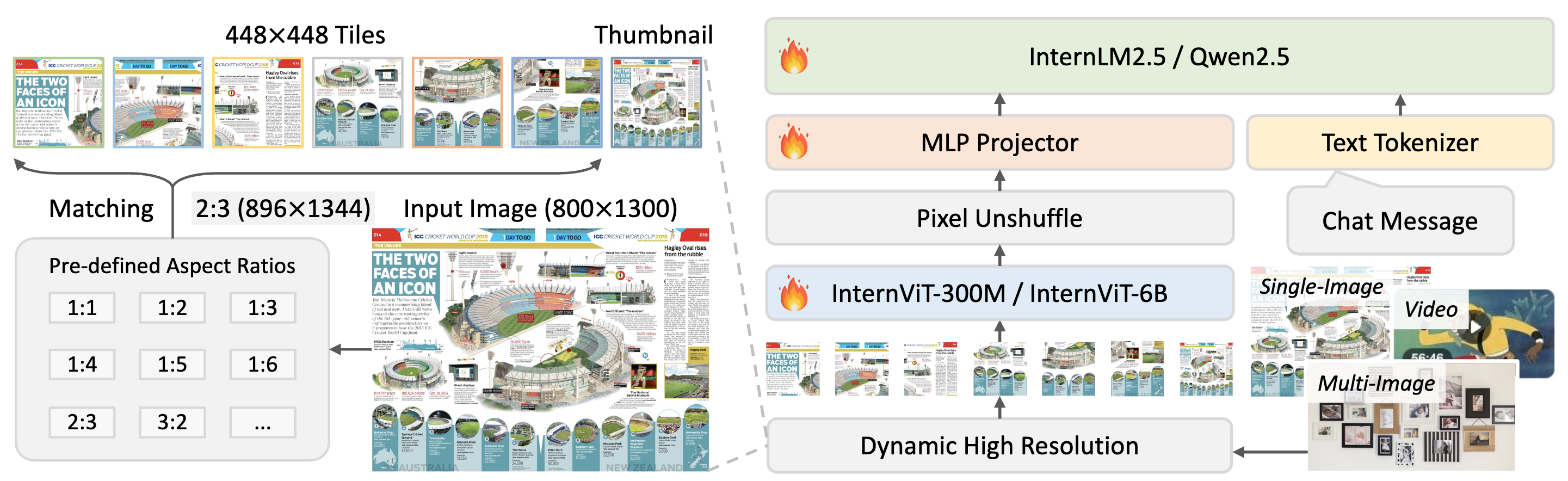
Overview of InternVL3 models architecture, which is the same as InternVL2.5. Taken from the original checkpoint.
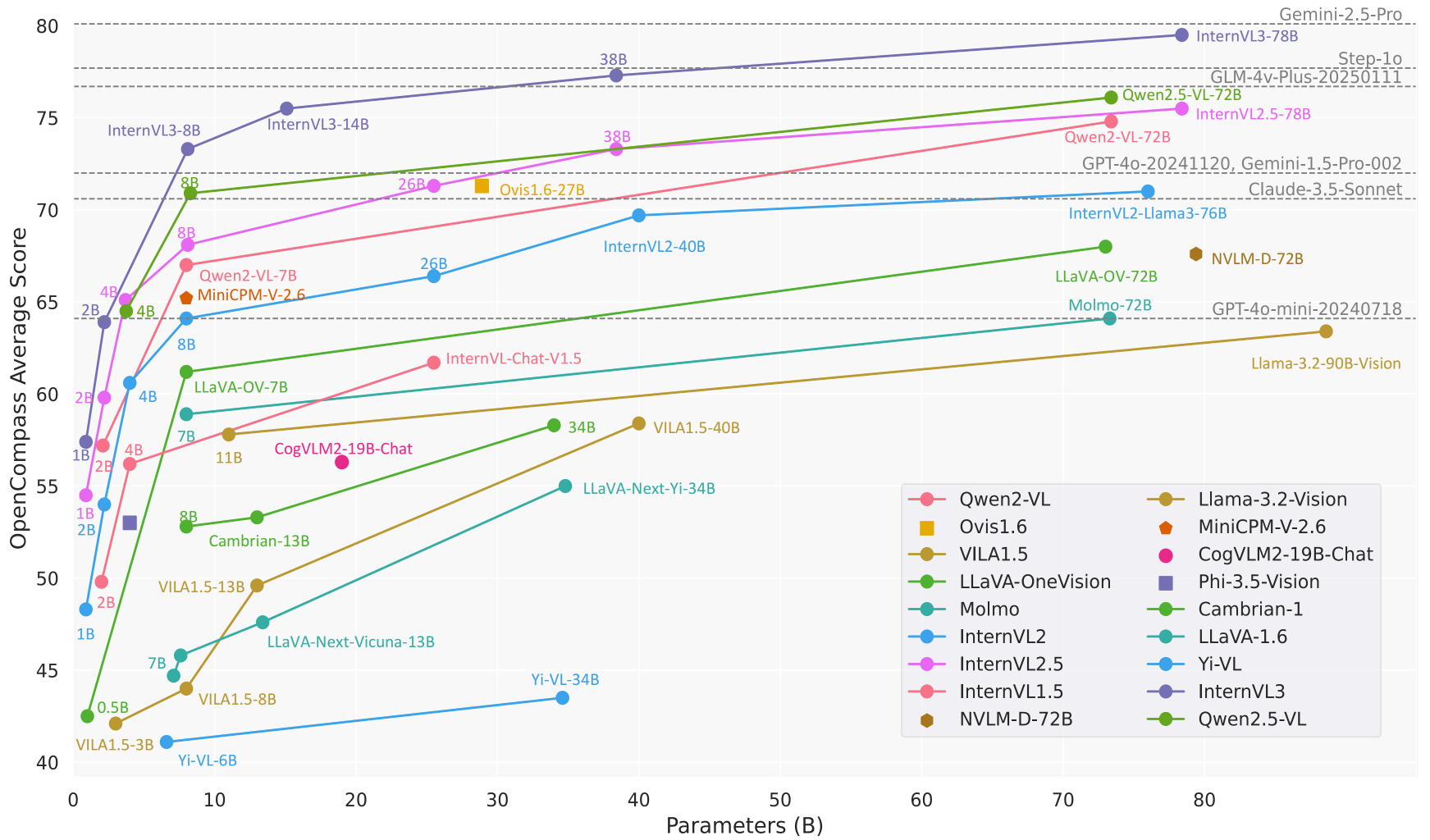
Comparison of InternVL3 performance on OpenCompass against other SOTA VLLMs. Taken from the original checkpoint.
This model was contributed by yonigozlan. The original code can be found here.
Usage example
Section titled “Usage example”Inference with Pipeline
Section titled “Inference with Pipeline”Here is how you can use the image-text-to-text pipeline to perform inference with the InternVL3 models in just a few lines of code:
>>> from transformers import pipeline
>>> messages = [...     {...         "role": "user",...         "content": [...             {...                 "type": "image",...                 "image": "https://huggingface.co/datasets/huggingface/documentation-images/resolve/main/bee.jpg",...             },...             {"type": "text", "text": "Describe this image."},...         ],...     },... ]
>>> pipe = pipeline("image-text-to-text", model="OpenGVLab/InternVL3-1B-hf")>>> outputs = pipe(text=messages, max_new_tokens=50, return_full_text=False)>>> outputs[0]["generated_text"]'The image showcases a vibrant scene of nature, featuring several flowers and a bee. \n\n1. **Foreground Flowers**: \n   - The primary focus is on a large, pink cosmos flower with a prominent yellow center. The petals are soft and slightly r'
Inference on a single image
Section titled “Inference on a single image”This example demonstrates how to perform inference on a single image with the InternVL models using chat templates.
>>> from transformers import AutoProcessor, AutoModelForImageTextToText>>> import torch
>>> model_checkpoint = "OpenGVLab/InternVL3-1B-hf">>> processor = AutoProcessor.from_pretrained(model_checkpoint)>>> model = AutoModelForImageTextToText.from_pretrained(model_checkpoint, device_map="auto", dtype=torch.bfloat16)
>>> messages = [...     {...         "role": "user",...         "content": [...             {"type": "image", "url": "http://images.cocodataset.org/val2017/000000039769.jpg"},...             {"type": "text", "text": "Please describe the image explicitly."},...         ],...     }... ]
>>> inputs = processor.apply_chat_template(messages, add_generation_prompt=True, tokenize=True, return_dict=True, return_tensors="pt").to(model.device, dtype=torch.bfloat16)
>>> generate_ids = model.generate(**inputs, max_new_tokens=50)>>> decoded_output = processor.decode(generate_ids[0, inputs["input_ids"].shape[1] :], skip_special_tokens=True)
>>> decoded_output'The image shows two cats lying on a pink blanket. The cat on the left is a tabby with a mix of brown, black, and white fur, and it appears to be sleeping with its head resting on the blanket. The cat on the'
Text-only generation
Section titled “Text-only generation”This example shows how to generate text using the InternVL model without providing any image input.
>>> from transformers import AutoProcessor, AutoModelForImageTextToText>>> import torch
>>> model_checkpoint = "OpenGVLab/InternVL3-1B-hf">>> processor = AutoProcessor.from_pretrained(model_checkpoint)>>> model = AutoModelForImageTextToText.from_pretrained(model_checkpoint, device_map="auto", dtype=torch.bfloat16)
>>> messages = [...     {...         "role": "user",...         "content": [...             {"type": "text", "text": "Write a haiku"},...         ],...     }... ]
>>> inputs = processor.apply_chat_template(messages, add_generation_prompt=True, tokenize=True, return_dict=True, return_tensors="pt").to(torch_device, dtype=torch.bfloat16)
>>> generate_ids = model.generate(**inputs, max_new_tokens=50)>>> decoded_output = processor.decode(generate_ids[0, inputs["input_ids"].shape[1] :], skip_special_tokens=True)
>>> print(decoded_output)"Whispers of dawn,\nSilent whispers of the night,\nNew day's light begins."
Batched image and text inputs
Section titled “Batched image and text inputs”InternVL models also support batched image and text inputs.
>>> from transformers import AutoProcessor, AutoModelForImageTextToText>>> import torch
>>> model_checkpoint = "OpenGVLab/InternVL3-1B-hf">>> processor = AutoProcessor.from_pretrained(model_checkpoint)>>> model = AutoModelForImageTextToText.from_pretrained(model_checkpoint, device_map="auto", dtype=torch.bfloat16)
>>> messages = [...     [...         {...             "role": "user",...             "content": [...                 {"type": "image", "url": "https://llava-vl.github.io/static/images/view.jpg"},...                 {"type": "text", "text": "Write a haiku for this image"},...             ],...         },...     ],...     [...         {...             "role": "user",...             "content": [...                 {"type": "image", "url": "https://www.ilankelman.org/stopsigns/australia.jpg"},...                 {"type": "text", "text": "Describe this image"},...             ],...         },...     ],... ]

>>> inputs = processor.apply_chat_template(messages, padding=True, add_generation_prompt=True, tokenize=True, return_dict=True, return_tensors="pt").to(model.device, dtype=torch.bfloat16)
>>> output = model.generate(**inputs, max_new_tokens=25)
>>> decoded_outputs = processor.batch_decode(output, skip_special_tokens=True)>>> decoded_outputs["user\n\nWrite a haiku for this image\nassistant\nSilky lake,  \nWooden pier,  \nNature's peace.", 'user\n\nDescribe this image\nassistant\nThe image shows a street scene with a traditional Chinese archway, known as a "Chinese Gate" or "Chinese Gate of']
Batched multi-image input
Section titled “Batched multi-image input”This implementation of the InternVL models supports batched text-images inputs with different number of images for each text.
>>> from transformers import AutoProcessor, AutoModelForImageTextToText>>> import torch
>>> model_checkpoint = "OpenGVLab/InternVL3-1B-hf">>> processor = AutoProcessor.from_pretrained(model_checkpoint)>>> model = AutoModelForImageTextToText.from_pretrained(model_checkpoint, device_map="auto", dtype=torch.bfloat16)
>>> messages = [...     [...         {...             "role": "user",...             "content": [...                 {"type": "image", "url": "https://llava-vl.github.io/static/images/view.jpg"},...                 {"type": "text", "text": "Write a haiku for this image"},...             ],...         },...     ],...     [...         {...             "role": "user",...             "content": [...                 {"type": "image", "url": "https://cdn.britannica.com/61/93061-050-99147DCE/Statue-of-Liberty-Island-New-York-Bay.jpg"},...                 {"type": "image", "url": "https://thumbs.dreamstime.com/b/golden-gate-bridge-san-francisco-purple-flowers-california-echium-candicans-36805947.jpg"},...                 {"type": "text", "text": "These images depict two different landmarks. Can you identify them?"},...             ],...         },...     ],>>> ]
>>> inputs = processor.apply_chat_template(messages, padding=True, add_generation_prompt=True, tokenize=True, return_dict=True, return_tensors="pt").to(model.device, dtype=torch.bfloat16)
>>> output = model.generate(**inputs, max_new_tokens=25)
>>> decoded_outputs = processor.batch_decode(output, skip_special_tokens=True)>>> decoded_outputs["user\n\nWrite a haiku for this image\nassistant\nSilky lake,  \nWooden pier,  \nNature's peace.", 'user\n\n\nThese images depict two different landmarks. Can you identify them?\nassistant\nYes, these images depict the Statue of Liberty and the Golden Gate Bridge.']
Video input
Section titled “Video input”InternVL models can also handle video inputs. Here is an example of how to perform inference on a video input using chat templates.
>>> from transformers import AutoProcessor, AutoModelForImageTextToText, BitsAndBytesConfig
>>> model_checkpoint = "OpenGVLab/InternVL3-8B-hf">>> quantization_config = BitsAndBytesConfig(load_in_4bit=True)>>> processor = AutoProcessor.from_pretrained(model_checkpoint)>>> model = AutoModelForImageTextToText.from_pretrained(model_checkpoint, quantization_config=quantization_config)
>>> messages = [...     {...         "role": "user",...         "content": [...             {...                 "type": "video",...                 "url": "https://huggingface.co/datasets/hf-internal-testing/fixtures_videos/resolve/main/tennis.mp4",...             },...             {"type": "text", "text": "What type of shot is the man performing?"},...         ],...     }>>> ]>>> inputs = processor.apply_chat_template(...     messages,...     return_tensors="pt",...     add_generation_prompt=True,...     tokenize=True,...     return_dict=True,...     num_frames=8,>>> ).to(model.device, dtype=torch.float16)
>>> output = model.generate(**inputs, max_new_tokens=25)
>>> decoded_output = processor.decode(output[0, inputs["input_ids"].shape[1] :], skip_special_tokens=True)>>> decoded_output'The man is performing a forehand shot.'
Interleaved image and video inputs
Section titled “Interleaved image and video inputs”This example showcases how to handle a batch of chat conversations with interleaved image and video inputs using chat template.
>>> from transformers import AutoProcessor, AutoModelForImageTextToText, BitsAndBytesConfig>>> import torch
>>> model_checkpoint = "OpenGVLab/InternVL3-1B-hf">>> processor = AutoProcessor.from_pretrained(model_checkpoint)>>> model = AutoModelForImageTextToText.from_pretrained(model_checkpoint, device_map="auto", dtype=torch.bfloat16)
>>> messages = [...     [...         {...             "role": "user",...             "content": [...                 {"type": "image", "url": "https://cdn.britannica.com/61/93061-050-99147DCE/Statue-of-Liberty-Island-New-York-Bay.jpg"},...                 {"type": "image", "url": "https://thumbs.dreamstime.com/b/golden-gate-bridge-san-francisco-purple-flowers-california-echium-candicans-36805947.jpg"},...                 {"type": "text", "text": "These images depict two different landmarks. Can you identify them?"},...             ],...         },...     ],...     [...         {...             "role": "user",...             "content": [...                 {"type": "video", "url": "https://huggingface.co/datasets/hf-internal-testing/fixtures_videos/resolve/main/tennis.mp4"},...                 {"type": "text", "text": "What type of shot is the man performing?"},...             ],...         },...     ],...     [...         {...             "role": "user",...             "content": [...                 {"type": "image", "url": "https://llava-vl.github.io/static/images/view.jpg"},...                 {"type": "text", "text": "Write a haiku for this image"},...             ],...         },...     ],>>> ]>>> inputs = processor.apply_chat_template(...     messages,...     padding=True,...     add_generation_prompt=True,...     tokenize=True,...     return_dict=True,...     return_tensors="pt",>>> ).to(model.device, dtype=torch.bfloat16)
>>> outputs = model.generate(**inputs, max_new_tokens=25)
>>> decoded_outputs = processor.batch_decode(outputs, skip_special_tokens=True)>>> decoded_outputs['user\n\n\nThese images depict two different landmarks. Can you identify them?\nassistant\nThe images depict the Statue of Liberty and the Golden Gate Bridge.', 'user\nFrame1: \nFrame2: \nFrame3: \nFrame4: \nFrame5: \nFrame6: \nFrame7: \nFrame8: \nWhat type of shot is the man performing?\nassistant\nA forehand shot', "user\n\nWrite a haiku for this image\nassistant\nSilky lake,  \nWooden pier,  \nNature's peace."]
InternVLVisionConfig
Section titled “InternVLVisionConfig”[[autodoc]] InternVLVisionConfig
InternVLConfig
Section titled “InternVLConfig”[[autodoc]] InternVLConfig
InternVLVisionModel
Section titled “InternVLVisionModel”[[autodoc]] InternVLVisionModel - forward
InternVLModel
Section titled “InternVLModel”[[autodoc]] InternVLModel - forward
InternVLForConditionalGeneration
Section titled “InternVLForConditionalGeneration”[[autodoc]] InternVLForConditionalGeneration - forward
InternVLProcessor
Section titled “InternVLProcessor”[[autodoc]] InternVLProcessor
InternVLVideoProcessor
Section titled “InternVLVideoProcessor”[[autodoc]] InternVLVideoProcessor