I-JEPA
This model was released on 2023-01-19 and added to Hugging Face Transformers on 2024-12-05.


I-JEPA
Section titled “I-JEPA”I-JEPA is a self-supervised learning method that learns semantic image representations by predicting parts of an image from other parts of the image. It compares the abstract representations of the image (rather than pixel level comparisons), which avoids the typical pitfalls of data augmentation bias and pixel-level details that don’t capture semantic meaning.
You can find the original I-JEPA checkpoints under the AI at Meta organization.
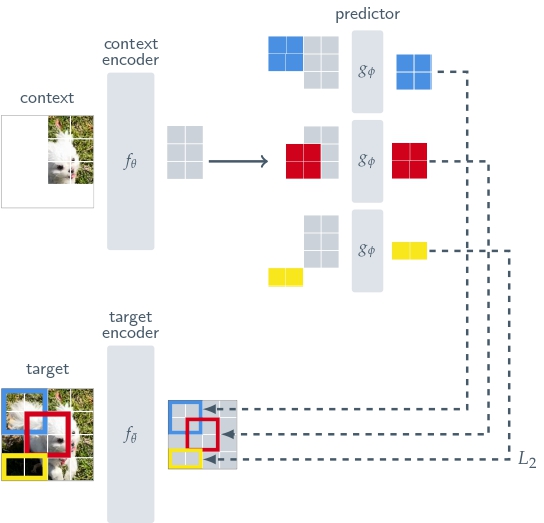
Click on the I-JEPA models in the right sidebar for more examples of how to apply I-JEPA to different image representation and classification tasks.
The example below demonstrates how to extract image features with Pipeline or the AutoModel class.
import torchfrom transformers import pipelinefeature_extractor = pipeline(    task="image-feature-extraction",    model="facebook/ijepa_vith14_1k",    device=0,    dtype=torch.bfloat16)features = feature_extractor("https://huggingface.co/datasets/huggingface/documentation-images/resolve/main/pipeline-cat-chonk.jpeg", return_tensors=True)
print(f"Feature shape: {features.shape}")
import requestsimport torchfrom PIL import Imagefrom torch.nn.functional import cosine_similarityfrom transformers import AutoModel, AutoProcessor
url_1 = "http://images.cocodataset.org/val2017/000000039769.jpg"url_2 = "http://images.cocodataset.org/val2017/000000219578.jpg"image_1 = Image.open(requests.get(url_1, stream=True).raw)image_2 = Image.open(requests.get(url_2, stream=True).raw)
processor = AutoProcessor.from_pretrained("facebook/ijepa_vith14_1k")model = AutoModel.from_pretrained("facebook/ijepa_vith14_1k", dtype="auto", attn_implementation="sdpa")
def infer(image): inputs = processor(image, return_tensors="pt") outputs = model(**inputs) return outputs.last_hidden_state.mean(dim=1)
embed_1 = infer(image_1)embed_2 = infer(image_2)
similarity = cosine_similarity(embed_1, embed_2)print(similarity)Quantization reduces the memory burden of large models by representing the weights in a lower precision. Refer to the Quantization overview for more available quantization backends. The example below uses bitsandbytes to only quantize the weights to 4-bits.
import torchfrom transformers import BitsAndBytesConfig, AutoModel, AutoProcessorfrom datasets import load_dataset
quantization_config = BitsAndBytesConfig(    load_in_4bit=True,    bnb_4bit_quant_type="nf4",    bnb_4bit_compute_dtype=torch.bfloat16,    bnb_4bit_use_double_quant=True,)
url_1 = "http://images.cocodataset.org/val2017/000000039769.jpg"url_2 = "http://images.cocodataset.org/val2017/000000219578.jpg"image_1 = Image.open(requests.get(url_1, stream=True).raw)image_2 = Image.open(requests.get(url_2, stream=True).raw)
processor = AutoProcessor.from_pretrained("facebook/ijepa_vitg16_22k")model = AutoModel.from_pretrained("facebook/ijepa_vitg16_22k", quantization_config=quantization_config, dtype="auto", attn_implementation="sdpa")

def infer(image):    inputs = processor(image, return_tensors="pt")    outputs = model(**inputs)    return outputs.last_hidden_state.mean(dim=1)

embed_1 = infer(image_1)embed_2 = infer(image_2)
similarity = cosine_similarity(embed_1, embed_2)print(similarity)
IJepaConfig
Section titled “IJepaConfig”[[autodoc]] IJepaConfig
IJepaModel
Section titled “IJepaModel”[[autodoc]] IJepaModel - forward
IJepaForImageClassification
Section titled “IJepaForImageClassification”[[autodoc]] IJepaForImageClassification - forward