Gemma 3
This model was released on 2025-03-25 and added to Hugging Face Transformers on 2025-03-12.


Gemma 3
Section titled “Gemma 3”Gemma 3 is a multimodal model with pretrained and instruction-tuned variants, available in 1B, 13B, and 27B parameters. The architecture is mostly the same as the previous Gemma versions. The key differences are alternating 5 local sliding window self-attention layers for every global self-attention layer, support for a longer context length of 128K tokens, and a SigLip encoder that can “pan & scan” high-resolution images to prevent information from disappearing in high resolution images or images with non-square aspect ratios.
The instruction-tuned variant was post-trained with knowledge distillation and reinforcement learning.
You can find all the original Gemma 3 checkpoints under the Gemma 3 release.
The example below demonstrates how to generate text based on an image with Pipeline or the AutoModel class.
import torchfrom transformers import pipeline
pipeline = pipeline(    task="image-text-to-text",    model="google/gemma-3-4b-pt",    device=0,    dtype=torch.bfloat16)pipeline(    "https://huggingface.co/datasets/huggingface/documentation-images/resolve/main/pipeline-cat-chonk.jpeg",    text="<start_of_image> What is shown in this image?")
import torchfrom transformers import AutoProcessor, Gemma3ForConditionalGeneration
model = Gemma3ForConditionalGeneration.from_pretrained( "google/gemma-3-4b-it", dtype=torch.bfloat16, device_map="auto", attn_implementation="sdpa")processor = AutoProcessor.from_pretrained( "google/gemma-3-4b-it", padding_side="left")
messages = [ { "role": "system", "content": [ {"type": "text", "text": "You are a helpful assistant."} ] }, { "role": "user", "content": [ {"type": "image", "url": "https://huggingface.co/datasets/huggingface/documentation-images/resolve/main/pipeline-cat-chonk.jpeg"}, {"type": "text", "text": "What is shown in this image?"}, ] },]inputs = processor.apply_chat_template( messages, tokenize=True, return_dict=True, return_tensors="pt", add_generation_prompt=True,).to(model.device)
output = model.generate(**inputs, max_new_tokens=50, cache_implementation="static")print(processor.decode(output[0], skip_special_tokens=True))echo -e "Plants create energy through a process known as" | transformers run --task text-generation --model google/gemma-3-1b-pt --device 0Quantization reduces the memory burden of large models by representing the weights in a lower precision. Refer to the Quantization overview for more available quantization backends.
The example below uses torchao to only quantize the weights to int4.
# pip install torchaoimport torchfrom transformers import TorchAoConfig, Gemma3ForConditionalGeneration, AutoProcessor
quantization_config = TorchAoConfig("int4_weight_only", group_size=128)model = Gemma3ForConditionalGeneration.from_pretrained(    "google/gemma-3-27b-it",    dtype=torch.bfloat16,    device_map="auto",    quantization_config=quantization_config)processor = AutoProcessor.from_pretrained(    "google/gemma-3-27b-it",    padding_side="left")
messages = [    {        "role": "system",        "content": [            {"type": "text", "text": "You are a helpful assistant."}        ]    },    {        "role": "user", "content": [            {"type": "image", "url": "https://huggingface.co/datasets/huggingface/documentation-images/resolve/main/pipeline-cat-chonk.jpeg"},            {"type": "text", "text": "What is shown in this image?"},        ]    },]inputs = processor.apply_chat_template(    messages,    tokenize=True,    return_dict=True,    return_tensors="pt",    add_generation_prompt=True,).to(model.device)
output = model.generate(**inputs, max_new_tokens=50, cache_implementation="static")print(processor.decode(output[0], skip_special_tokens=True))
Use the AttentionMaskVisualizer to better understand what tokens the model can and cannot attend to.
from transformers.utils.attention_visualizer import AttentionMaskVisualizer
visualizer = AttentionMaskVisualizer("google/gemma-3-4b-it")visualizer("<img>What is shown in this image?")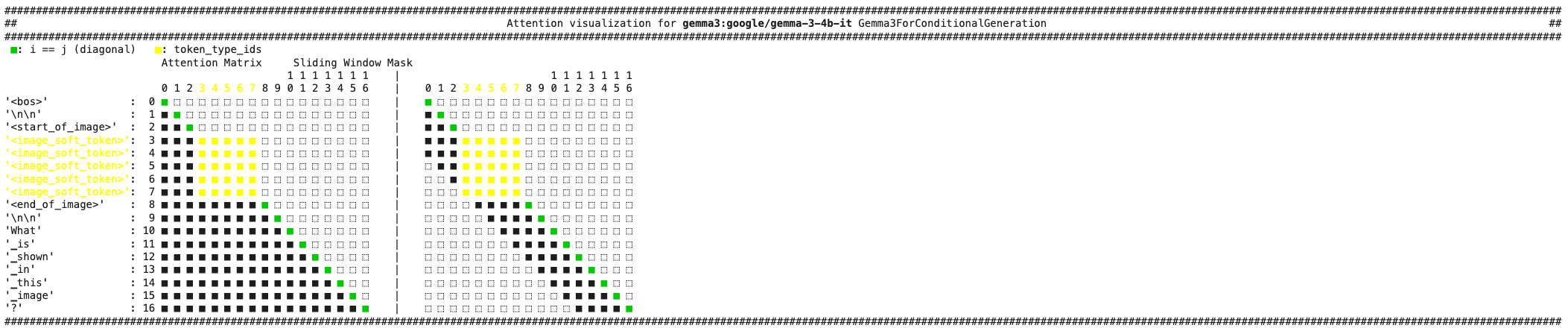
-
Use
Gemma3ForConditionalGenerationfor image-and-text and image-only inputs. -
Gemma 3 supports multiple input images, but make sure the images are correctly batched before passing them to the processor. Each batch should be a list of one or more images.
url_cow = "https://media.istockphoto.com/id/1192867753/photo/cow-in-berchida-beach-siniscola.jpg?s=612x612&w=0&k=20&c=v0hjjniwsMNfJSuKWZuIn8pssmD5h5bSN1peBd1CmH4="url_cat = "https://huggingface.co/datasets/huggingface/documentation-images/resolve/main/pipeline-cat-chonk.jpeg"messages =[{"role": "system","content": [{"type": "text", "text": "You are a helpful assistant."}]},{"role": "user","content": [{"type": "image", "url": url_cow},{"type": "image", "url": url_cat},{"type": "text", "text": "Which image is cuter?"},]},] -
Text passed to the processor should have a
<start_of_image>token wherever an image should be inserted. -
The processor has its own
apply_chat_templatemethod to convert chat messages to model inputs. -
By default, images aren’t cropped and only the base image is forwarded to the model. In high resolution images or images with non-square aspect ratios, artifacts can result because the vision encoder uses a fixed resolution of 896x896. To prevent these artifacts and improve performance during inference, set
do_pan_and_scan=Trueto crop the image into multiple smaller patches and concatenate them with the base image embedding. You can disable pan and scan for faster inference.inputs = processor.apply_chat_template(messages,tokenize=True,return_dict=True,return_tensors="pt",add_generation_prompt=True,do_pan_and_scan=True,).to(model.device) -
For Gemma-3 1B checkpoint trained in text-only mode, use
AutoModelForCausalLMinstead.import torchfrom transformers import AutoModelForCausalLM, AutoTokenizertokenizer = AutoTokenizer.from_pretrained("google/gemma-3-1b-pt",)model = AutoModelForCausalLM.from_pretrained("google/gemma-3-1b-pt",dtype=torch.bfloat16,device_map="auto",attn_implementation="sdpa")input_ids = tokenizer("Plants create energy through a process known as", return_tensors="pt").to(model.device)output = model.generate(**input_ids, cache_implementation="static")print(tokenizer.decode(output[0], skip_special_tokens=True))
Gemma3ImageProcessor
Section titled “Gemma3ImageProcessor”[[autodoc]] Gemma3ImageProcessor
Gemma3ImageProcessorFast
Section titled “Gemma3ImageProcessorFast”[[autodoc]] Gemma3ImageProcessorFast
Gemma3Processor
Section titled “Gemma3Processor”[[autodoc]] Gemma3Processor
Gemma3TextConfig
Section titled “Gemma3TextConfig”[[autodoc]] Gemma3TextConfig
Gemma3Config
Section titled “Gemma3Config”[[autodoc]] Gemma3Config
Gemma3TextModel
Section titled “Gemma3TextModel”[[autodoc]] Gemma3TextModel - forward
Gemma3Model
Section titled “Gemma3Model”[[autodoc]] Gemma3Model
Gemma3ForCausalLM
Section titled “Gemma3ForCausalLM”[[autodoc]] Gemma3ForCausalLM - forward
Gemma3ForConditionalGeneration
Section titled “Gemma3ForConditionalGeneration”[[autodoc]] Gemma3ForConditionalGeneration - forward
Gemma3ForSequenceClassification
Section titled “Gemma3ForSequenceClassification”[[autodoc]] Gemma3ForSequenceClassification - forward
Gemma3TextForSequenceClassification
Section titled “Gemma3TextForSequenceClassification”[[autodoc]] Gemma3TextForSequenceClassification - forward