Cohere
This model was released on 2024-03-12 and added to Hugging Face Transformers on 2024-03-15.


Cohere
Section titled “Cohere”Cohere Command-R is a 35B parameter multilingual large language model designed for long context tasks like retrieval-augmented generation (RAG) and calling external APIs and tools. The model is specifically trained for grounded generation and supports both single-step and multi-step tool use. It supports a context length of 128K tokens.
You can find all the original Command-R checkpoints under the Command Models collection.
The example below demonstrates how to generate text with Pipeline or the AutoModel, and from the command line.
import torchfrom transformers import pipeline
pipeline = pipeline(    task="text-generation",    model="CohereForAI/c4ai-command-r-v01",    dtype=torch.float16,    device=0)pipeline("Plants create energy through a process known as")
import torchfrom transformers import AutoTokenizer, AutoModelForCausalLM
tokenizer = AutoTokenizer.from_pretrained("CohereForAI/c4ai-command-r-v01")model = AutoModelForCausalLM.from_pretrained("CohereForAI/c4ai-command-r-v01", dtype=torch.float16, device_map="auto", attn_implementation="sdpa")
# format message with the Command-R chat templatemessages = [{"role": "user", "content": "How do plants make energy?"}]input_ids = tokenizer.apply_chat_template(messages, tokenize=True, add_generation_prompt=True, return_tensors="pt").to(model.device)output = model.generate( input_ids, max_new_tokens=100, do_sample=True, temperature=0.3, cache_implementation="static",)print(tokenizer.decode(output[0], skip_special_tokens=True))# pip install -U flash-attn --no-build-isolationtransformers chat CohereForAI/c4ai-command-r-v01 --dtype auto --attn_implementation flash_attention_2Quantization reduces the memory burden of large models by representing the weights in a lower precision. Refer to the Quantization overview for more available quantization backends.
The example below uses bitsandbytes to quantize the weights to 4-bits.
import torchfrom transformers import BitsAndBytesConfig, AutoTokenizer, AutoModelForCausalLM
bnb_config = BitsAndBytesConfig(load_in_4bit=True)tokenizer = AutoTokenizer.from_pretrained("CohereForAI/c4ai-command-r-v01")model = AutoModelForCausalLM.from_pretrained("CohereForAI/c4ai-command-r-v01", dtype=torch.float16, device_map="auto", quantization_config=bnb_config, attn_implementation="sdpa")
# format message with the Command-R chat templatemessages = [{"role": "user", "content": "How do plants make energy?"}]input_ids = tokenizer.apply_chat_template(messages, tokenize=True, add_generation_prompt=True, return_tensors="pt").to(model.device)output = model.generate(    input_ids,    max_new_tokens=100,    do_sample=True,    temperature=0.3,    cache_implementation="static",)print(tokenizer.decode(output[0], skip_special_tokens=True))
Use the AttentionMaskVisualizer to better understand what tokens the model can and cannot attend to.
from transformers.utils.attention_visualizer import AttentionMaskVisualizer
visualizer = AttentionMaskVisualizer("CohereForAI/c4ai-command-r-v01")visualizer("Plants create energy through a process known as")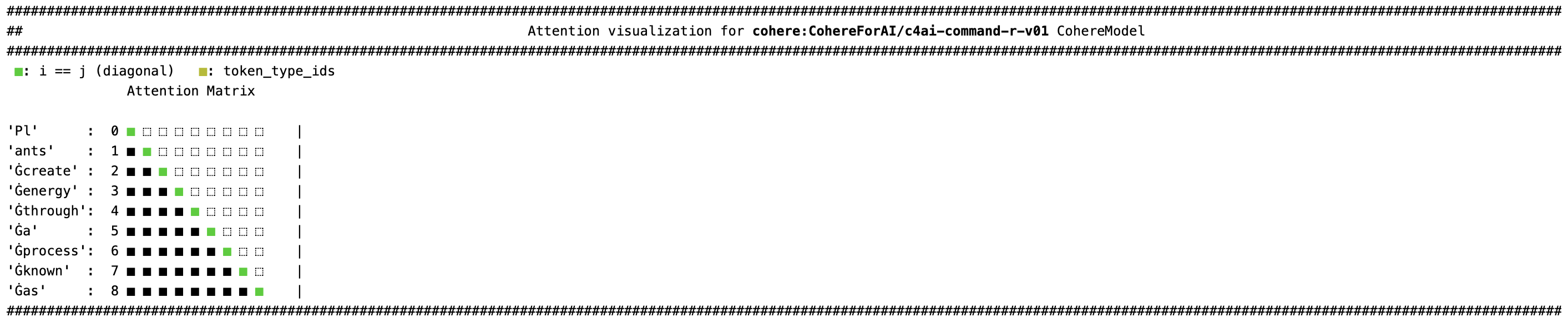
- Don’t use the dtype parameter in
from_pretrainedif you’re using FlashAttention-2 because it only supports fp16 or bf16. You should use Automatic Mixed Precision, set fp16 or bf16 to True if usingTrainer, or use torch.autocast.
CohereConfig
Section titled “CohereConfig”[[autodoc]] CohereConfig
CohereTokenizer
Section titled “CohereTokenizer”[[autodoc]] CohereTokenizer
CohereModel
Section titled “CohereModel”[[autodoc]] CohereModel - forward
CohereForCausalLM
Section titled “CohereForCausalLM”[[autodoc]] CohereForCausalLM - forward